
OWASP Top 10 2025 Support Now Coming to WAS and TotalAppSec

Overview
Qualys Web Application Scanning (WAS) and TotalAppSec (TAS) are upgrading to the OWASP Top 10 2025. This brings WAS and TAS in line with the latest global standard for web application security, ensuring vulnerability classifications align with the latest OWASP classification.
Note: This update covers the OWASP Top 10 for Web Applications only. API security vulnerabilities are categorized under the separate OWASP API Security Top 10 2023, which is not affected by this change.
The update applies to all OWASP category mappings across WAS and TAS simultaneously. Most OWASP category numbers (A01 through A10) will point to different vulnerability categories after the update. This notification covers exactly what changes, where you will see them, and what you need to do before the release date.
Release Timeline
This update ships with the WASUI 1.28 release, expected in the first week of May 2026. All changes take effect simultaneously when the release is deployed to your pod. The exact date will differ per pod. Watch the Qualys Status Page for the 1.28 release schedule for your specific pod.
We recommend completing all preparation steps outlined in this notification before the 1.28 release reaches your pod.
What Changed in OWASP Top 10 from 2021 to 2025
The OWASP Foundation has updated the Top 10 for Web Applications for the first time since 2021. The 2025 edition reorganizes category numbering, renames several categories, and adjusts scope. Most OWASP category identifiers (A01 through A10) will map to different vulnerability groups after the update. The vulnerabilities themselves do not change; only their OWASP category alignment is updated. Categories have been added, removed, merged, and repositioned based on four years of new threat data and real-world breach patterns.
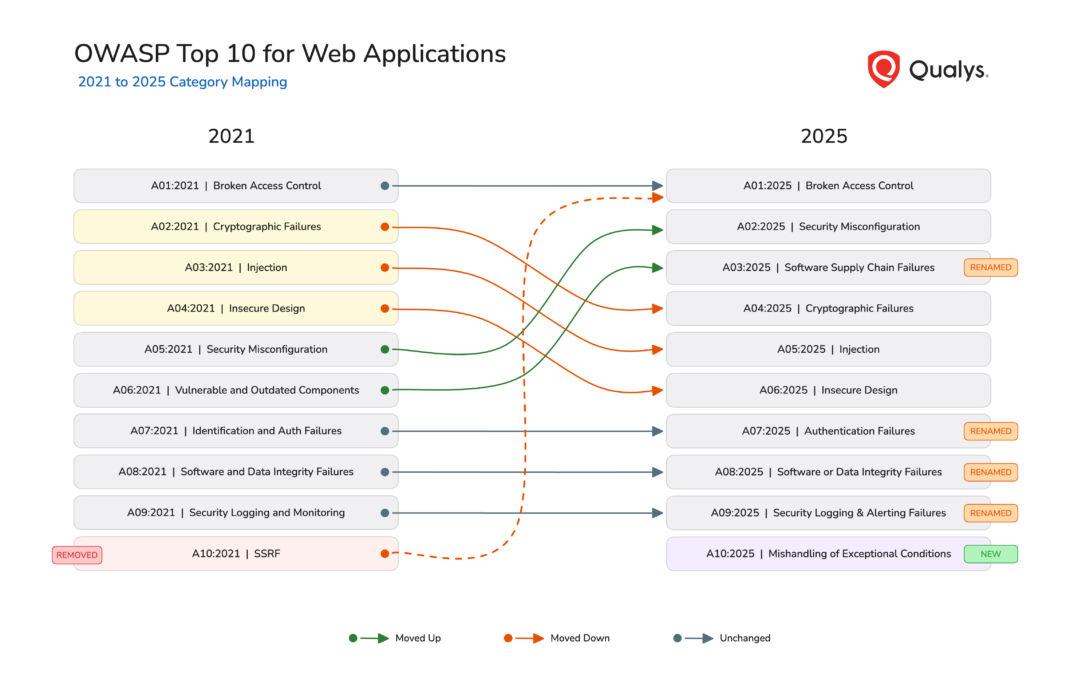
For the complete details on each category, visit the OWASP Top 10:2025 official site.
What Changes for You
The common thread is QQL. QQL is the query engine that powers filtering across WAS and TAS. Anywhere you use QQL with OWASP tokens, the results will change after the update. The OWASP tokens to watch for are:
- Detections and Scans:
finding.owaspTopTen.id,finding.owaspTopTen.name,scan.finding.owaspTopTen.id,scan.finding.owaspTopTen.name - KnowledgeBase:
vulnDef.owaspTopTen.code,vulnDef.owaspTopTen.name - v3 API:
owasp.code,owasp.name
Dashboard Widgets
What happens automatically: Widgets displaying OWASP-based vulnerability distribution will show 2025 category labels, codes, and groupings. The A10 SSRF slice merges into A01 Broken Access Control, and a new A10 Mishandling of Exceptional Conditions slice appears.
What you need to do: If your widgets use custom QQL filters with OWASP tokens, audit and update the code values and name strings. Generate a report or download a PDF of current widgets before the release date for comparison.
Saved Searches and Search Lists
What happens automatically: Nothing. Saved searches are not updated by the release.
What you need to do: Audit all saved searches that use owasp.code or owasp.name filters. A search filtering on owasp.code:3 currently returns Injection findings. After the update, the same code will return findings classified under the 2025 category for that code, which is Software Supply Chain Failures. Searches using renamed category names (such as “Vulnerable and Outdated Components”) will return no results. Update code values and name strings to match 2025 categories using the OWASP Top 10:2025 mapping. Review search lists that include OWASP-based criteria.
KnowledgeBase
What happens automatically: Every QID entry will display updated OWASP 2025 references. KnowledgeBase searches using OWASP codes or names will return results based on the new mappings.
What you need to do: Update any internal documentation that maps QIDs to specific OWASP categories. Adjust any bookmarked or shared KnowledgeBase search queries that use vulnDef.owaspTopTen.code or vulnDef.owaspTopTen.name tokens.
Web Application Statistics
What happens automatically: The OWASP Top Five Risks view on each web application’s Statistics tab will reflect the 2025 categories. The top five list may change as vulnerabilities are regrouped.
What you need to do: Nothing. Inform application owners and risk stakeholders so that the change is expected.
Reports and Report Templates
What happens automatically: Reports using the VULNERABILITIES_BY_OWASP graph or OWASP grouping will produce output based on the 2025 categories. Stored report templates with OWASP grouping will also generate updated results.
What you need to do: Audit report templates that include OWASP grouping or graphs. If you have built your own compliance or trend reports using OWASP categories, re-baseline them after the update. For trend reports spanning the transition date, category shifts reflect the remapping rather than actual changes in vulnerability counts. Export current reports before the release date if you need a 2021 baseline for comparison.
Pro Tip: If you rely on OWASP-based trend reports to show improvement over time, expect a “cliff” or “spike” on the release date. This is not a change in your security posture, but a change in how we categorize the same bugs.
Detection Scope and Option Profiles
What happens automatically: Nothing. Detection scope configurations are not updated by the release.
What you need to do: Review all detection scope configurations and option profiles that reference OWASP categories by code or name. These will match different vulnerability types after the update. Validate that they still target the intended vulnerability types.
Downstream and External Systems (Jira, ServiceNow, SIEM, GRC)
What happens automatically: Nothing. The OWASP category update is a classification change, not a detection change. ITSM integrations trigger on detection events such as new findings, status changes, or retests. Since the underlying detection has not changed, no sync event will fire. Tickets and records already created in external systems will retain their original 2021 OWASP data.
What you need to do: Decide how to handle the OWASP data mismatch in your external systems. Options include:
- Accept the mismatch for historical tickets. New findings going forward will carry 2025 categories. Old tickets stay as is. Document the version boundary for audit purposes.
- Bulk update external records. Use the OWASP Top 10:2025 mapping to update OWASP fields on existing tickets in Jira, ServiceNow, or your data warehouse. This can be scripted using the category mapping.
Preparing Your API Integrations
v3 API
The v3 API does not include a year field in OWASP data. After the update, both request filters and response fields will use 2025 categories without any version indicator. This affects integrations on two fronts:
- Request side: Integrations that filter findings by OWASP code or name will silently match different vulnerability types. For example, a request filtering on
owasp.code:3currently returns Injection findings. After the update, the same request returns Software Supply Chain Failures findings. - Response side: OWASP fields (
code,name,url) in finding responses will reflect 2025 categories. Integrations that parse or store these values will receive different data for the same vulnerability types.
Affected endpoints:
| Endpoint | Request Impact | Response Impact |
|---|---|---|
POST /qps/rest/3.0/search/was/finding | Filters owasp.name, owasp.code match different categories | owasp list returns 2025 values |
POST /qps/rest/3.0/count/was/finding | Filters owasp.name, owasp.code match different categories | Count reflects new category scope |
GET /qps/rest/3.0/get/was/finding/{id} | N/A | owasp list returns 2025 values |
GET /qps/rest/3.0/download/was/wasscan/{id} | N/A | stats.byOwasp returns OWASP-A# with 2025 mappings |
POST /qps/rest/3.0/create/was/report | display.graphs: VULNERABILITIES_BY_OWASP produces 2025 grouping | Report content uses 2025 categories |
POST /qps/rest/3.0/activate/was/finding | Filters owasp.name, owasp.code match different categories | N/A |
POST /qps/rest/3.0/ignore/was/finding | Filters owasp.name, owasp.code match different categories | N/A |
Action: Audit all v3 API integrations for hardcoded OWASP code values and name strings in both request filters and response parsing logic. Update them using the OWASP Top 10:2025 mapping.
v4 API
The v4 API includes a year field in OWASP responses, making the transition visible. After the update, the year field changes from 2021 to 2025, code values shift, and name values update. Integrations that filter on year: 2021 will return no results. Integrations that parse only the code field without checking year will get wrong categories.
Affected endpoints:
| Endpoint | Impact |
|---|---|
POST /rest/finding/4.0/search | Response vulnDetails.owaspCategories[] returns 2025 year, codes, and names |
POST /rest/scan/4.0/result | Response vulnDetails.owaspCategories[] returns 2025 year, codes, and names |
Action: Review v4 integrations for hardcoded year: 2021 filters or specific code values. Update to handle year: 2025 and the new code mappings.
Preparing Your QQL Queries and Saved Searches
Several QQL tokens reference OWASP categories across different WAS and TAS tabs. These tokens power saved searches, widgets, search lists, detection scopes, and API queries.
WAS/TAS Detections and Scans Tabs
| Token | Type | Example |
|---|---|---|
finding.owaspTopTen.id | integer | finding.owaspTopTen.id: 7 |
finding.owaspTopTen.name | text | finding.owaspTopTen.name: "Injection" |
scan.finding.owaspTopTen.id | integer | scan.finding:(owaspTopTen.id: 7) |
scan.finding.owaspTopTen.name | text | scan.finding:(owaspTopTen.name: "Injection") |
WAS/TAS KnowledgeBase Tab
| Token | Type | Example |
|---|---|---|
vulnDef.owaspTopTen.code | text | vulnDef.owaspTopTen.code: A07 |
vulnDef.owaspTopTen.name | text | vulnDef.owaspTopTen.name: "Cryptographic Failures" |
After the update, code-based tokens will map to their new 2025 categories. Name-based tokens using renamed categories (such as “Vulnerable and Outdated Components”) should be updated to the new names (such as “Software Supply Chain Failures”). Use the OWASP Top 10:2025 mapping as your guide.
What Stays the Same
This update does not affect the following areas:
- TruRisk(TM) scores: TruRisk(TM) calculations use QDS, ACS, and severity weighting. OWASP categories are not a factor.
- OWASP API Security Top 10 2023: API security categorization is a separate standard and is not changing.
- Tag rules and auto tagging: Asset-based, not tied to OWASP classification.
- Notification rules: Use search lists and QID-based triggers, not OWASP category triggers.
- CI/CD plugins: Native plugins (Jenkins, Azure DevOps, Bamboo, TeamCity, GitHub Actions) use severity and QID-based quality gates, not OWASP categories.
Frequently Asked Questions
When does this take effect?
See Release Timeline for the schedule and how to check your pod’s deployment date.
Will there be a transition period with both versions available?
No. WAS and TAS will move directly to the 2025 categories. This ensures consistency across all views, searches, and API responses from day one.
What happens to my historical findings?
This update applies to all findings, not just scans launched after the release date. Existing vulnerabilities on existing applications will display the new 2025 category mappings. Historical data, reports, and dashboards will all reflect the updated categories. Your data remains intact and fully searchable. The only change is which OWASP category each finding maps to.
Will my saved searches still work?
Saved searches using numeric OWASP codes will still execute, but will return results for different categories. Saved searches using renamed category names will return no results. We recommend reviewing all OWASP-based saved searches and updating them using the OWASP Top 10:2025 mapping.
How does this affect my API integrations?
The v3 API has no year field, so integrations need to update hardcoded OWASP code and name values. The v4 API includes a year field that changes from 2021 to 2025, making the transition visible. Both versions require updates to any hardcoded OWASP values.
Does this affect TruRisk(TM) scores?
No. TruRisk(TM) calculations are independent of OWASP categories.
Does this affect API security categorization?
No. The OWASP API Security Top 10 2023 is a separate standard and is not part of this update.
Will compliance reports need to be re-baselined?
Yes. If your organization has built compliance reports or documentation that reference OWASP Top 10 categories, update those baselines to reflect the 2025 categories after the release.
Recommended Actions
We recommend completing the following before the release date.
| Action | Who |
|---|---|
| Review and update saved searches using OWASP filters | All users with saved searches |
| Update dashboard widgets referencing OWASP categories | Dashboard administrators |
| Review detection scope configurations | Security administrators |
| Update API integration code that parses OWASP fields | Integration developers |
| Update ETL pipelines, SIEM rules, and GRC tool mappings | Security operations teams |
| Plan for OWASP data mismatch in Jira, ServiceNow, and other ITSM tools with previously synced findings | Integration owners |
| Update custom CI/CD scripts that parse OWASP fields from API responses | DevSecOps teams |
| Re-baseline any compliance or trend reports you have built using OWASP categories | Compliance teams |
| Update internal documentation and training materials | Security teams |
| Familiarize teams with the 2025 category names and numbering | All WAS and TAS users |
What’s Next
Explore the OWASP Top 10:2025 official site for detailed information about each new category and what changed from 2021. Use the OWASP Top 10:2025 mapping to update your saved searches, API integrations, and automation workflows ahead of the release date.
For questions or assistance, contact Qualys Tech Support.