
Upcoming Expiration of Qualys SAML Certificate

Overview
We prioritize user security and aim to ensure a seamless experience when accessing Qualys services. To maintain the highest security standards, we regularly update our SAML certificates. The current Qualys SAML certificates will expire on May 20, 2026. Immediate action is required to ensure uninterrupted access to the Qualys SAML login.
To support a smooth transition, import the newly generated Certificate Authority (CA) certificate into your SAML Identity Provider (IdP) configuration.
What Functions Are Impacted
- Users with SAML SSO enabled in Qualys IdP configuration and signature verification enabled in the IdP are impacted. If SAML SSO is enabled but signature verification is not enabled in your IdP, no action is required.
- API users are not impacted.
- Users not using SAML SSO are not impacted.
How to Check if Signature Verification is Enabled
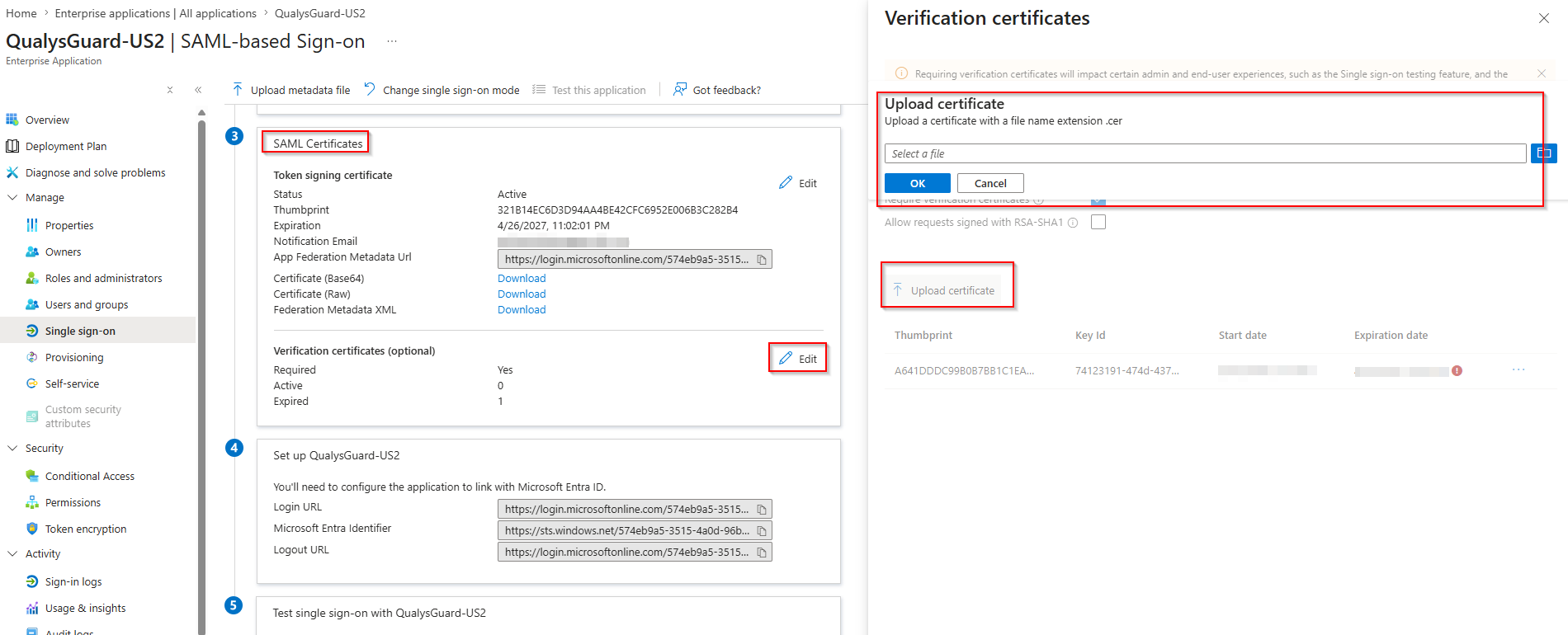
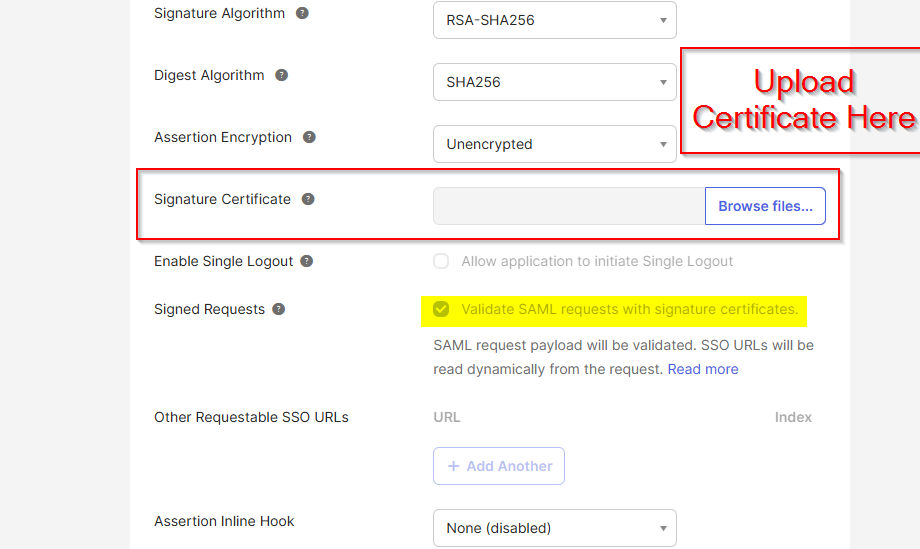
You can check the signature verification setting in your IdP. Here are examples for Azure and Okta.
Action Required
If you are using SAML Single Sign-On (SSO) with signature verification enabled to log in to the Qualys UI, you must replace the certificates as described in this communication to ensure uninterrupted access. If you are affected by this change, you should have received an email from the Qualys team outlining the required updates. Acting promptly will help avoid any disruption to Qualys services. Instructions for downloading and importing the new certificate are available in this article. Engage your IdP administrator to assist with the import process.
Temporary Workarounds
Option 1: To avoid potential login issues due to certificate expiration or delays in uploading the new certificate, create a temporary “Non-SAML user.” This ensures that at least one user can access the Qualys UI during the transition period. Once the new certificates are successfully uploaded and the SAML login is restored, you can choose to delete or disable the temporary “Non-SAML user.”
Option 2: Temporarily disable signature verification in your IdP.
Option 3: Contact Qualys Support to temporarily disable SAML SSO from the backend.
Platform-Specific Certificate Update Dates
The table below lists the platforms where Qualys Operations will update certificates. Replace the certificate on your end promptly to maintain seamless login access.
| Platform | Certificate Update Date and Time |
| All Shared Cloud Platforms | 20th May 2026, 10:00 AM PDT |
Frequently Asked Questions
Why is the composition of the certificate changing?
The threat model for enterprise SaaS applications has changed. Given significant advancements in computing and computational analysis, security professionals must respond to evolving cryptographic risks by strengthening trust infrastructure, such as certificates, and adopting modern hashing algorithms. Current NIST guidance makes clear that certain cryptographic models will likely not provide sufficient protection beyond 2030.
Why does this certificate have a 3-year expiration instead of 10 years?
The changing cryptographic threat model must include the acceptance that traditional high-performance computing and quantum computing are scaling to levels that introduce new threats. Best practices are changing to support shorter-lived certificates. Given these realities, organizations must become more responsive to cryptographic risk. Shortening the time allowed for a certificate helps address those risks in practical ways aligned with evolving guidance.
Qualys customers are encouraged to contact their Technical Account Manager or Qualys Support for assistance. Qualys is committed to supporting you throughout the process, offering help and guidance to ensure a smooth transition.