
Qualys Kubernetes & Container Security: What’s New in the Release 1.43

As organizations scale their containerized and Kubernetes-based workloads, enforcing compliance, managing sensor configurations, and keeping software up to date have become increasingly complex. We are committed to supporting our customers with new capabilities that simplify these challenges and strengthen security posture.
With Release 1.43, Qualys Kubernetes & Container Security delivers powerful new ways to discover shadow AI, enforce secure compliance in builds, and scale your container scanning out to next-gen workloads. Alongside these platform capabilities, QScanner v5.0.0 — the scanning utility that ships with this release — modernizes how images and containers are scanned from the CLI and CI/CD pipelines, adding OAuth-based authentication, build-pipeline traceability, and air-gapped-friendly scanning.
Qualys Container Security 1.43 updates
This release delivers a broad set of enhancements across the Qualys Container Security platform and the QScanner v5.0.0 scanning utility — focused on stronger compliance enforcement, smarter automation, deeper lifecycle visibility, secure authentication, and more flexible registry and pipeline scanning.
Code-to-Cloud and Authentication Enhancements
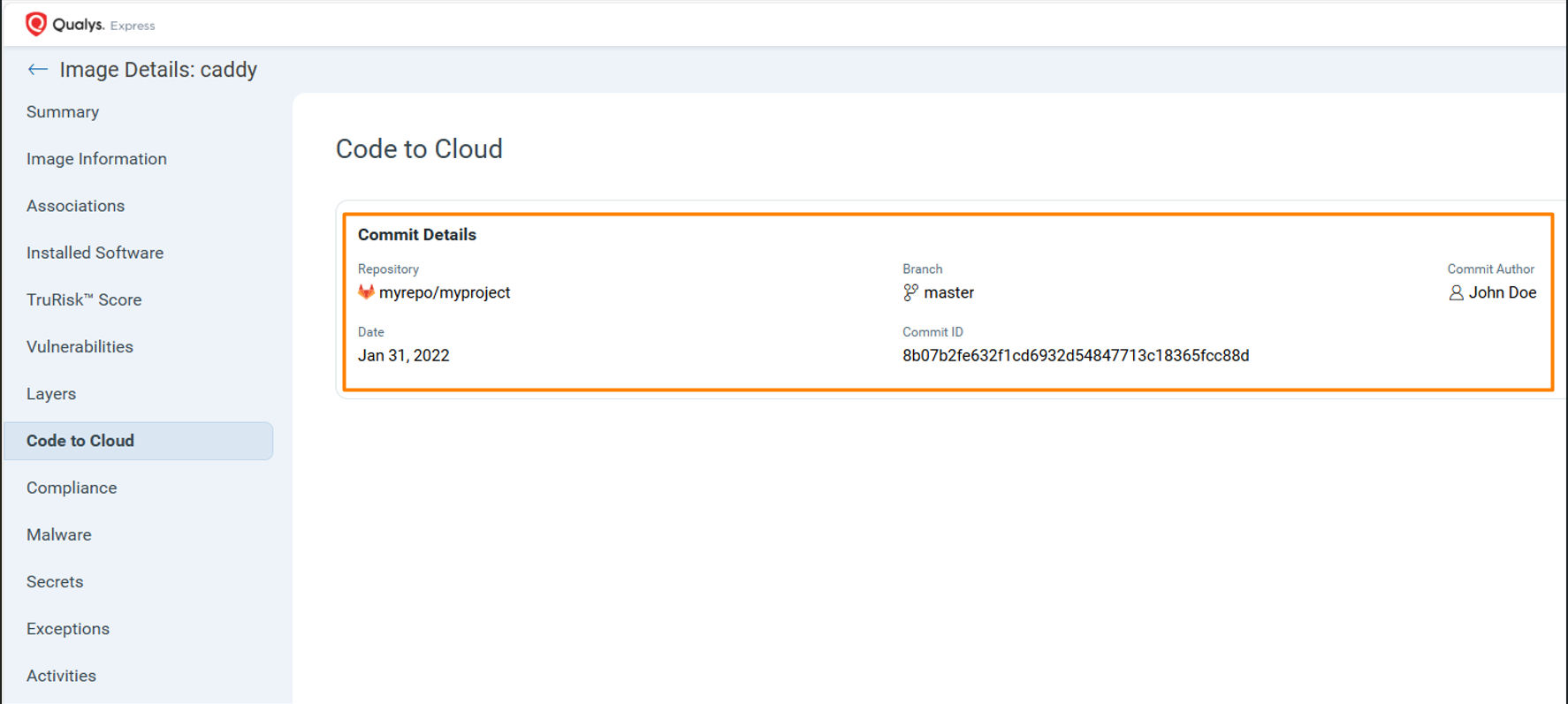
Code-to-Cloud Metadata Collection
Security findings are far more valuable when tied to the exact build context in which they were introduced. Without that context, triage means slow, manual log inspection to trace an issue back to its source.
Starting with QScanner v5.0.0, the scanner automatically collects build pipeline metadata during the Code-to-Cloud metadata scan, including repository name, branch, commit hash, author name, author email, and other pipeline attributes. QScanner gathers this information directly from environment variables available within your CI/CD pipeline. The feature is enabled by default and can be disabled with “--collect-build-pipeline-metadata=false”.
Here is why Code-to-Cloud metadata matters:
- Precise traceability — map a vulnerability or secret back to the exact commit, branch, repository, and developer, reducing investigation time.
- Faster remediation — security teams immediately identify the owning team or contributor, improving Mean Time To Remediate (MTTR).
- Improved supply chain visibility — quickly identify which builds consumed an affected package and trace exposure across repositories and branches.
- Better governance and compliance — stronger audit trails, change tracking, and DevSecOps reporting.
- Graceful fallback — if QScanner runs outside a build pipeline or in an unsupported one, scans are not impacted; the BuildPipelineMetadata fields simply show “Unknown”.
Supported platforms and the environment variables QScanner reads:
| SI | Parameter | GitLab | GitHub | Jenkins |
| 1 | Repository^ | CI_RESPOSITORY_URL | GITHUB_REPOSITORY | JOB_URL |
| 2 | Branch^ | CI_COMMIT_BRANCH | GITHUB_REF_NAME | BRANCH_NAME, GIT_BRANCH |
| 3 | Commit Hash | CI_COMMIT_MESSAGE | GITHUB_SHA | GIT_COMMIT |
| 4 | Commit Message | CI_COMMIT_MESSAGE | – | – |
| 5 | Commit Author Name | CI_COMMIT_AUTHOR | GITHUB_TRIGGER ING_ACTOR | GIT_AUTHOR_NAME |
| 6 | Commit Author Email | CI_COMMIT_TIME STAMP | – | – |
| 7 | Commit Timestamp | CI_COMMIT_TIME STAMP | – | – |
| 8 | Last Build Commit | CI_COMMIT_BEF ORE_SHA | – | GIT_PREVIOUS_C OMMIT |
| 9 | Event | CI_PIPELINE_SOU RCE | – | – |
OAuth-Based Authentication
Long-lived, subscription-scoped access tokens are difficult to revoke, rotate, and scope to individual users — leaving security teams with limited control if a credential is ever exposed. QScanner v5.0.0 modernizes how the scanner authenticates with Qualys backend services.
QScanner v5.0.0 now supports OAuth-based authentication, replacing long-lived, subscription-scoped access tokens with short-lived, user-scoped tokens that can be revoked, scoped, and refreshed automatically. The release also introduces developer-scoped tokens with limited permissions, so developer test scans no longer clutter the production UI.
Here is what OAuth-based authentication brings to your scanning workflows:
- Token revocation — OAuth tokens can be deactivated immediately when needed, providing instant security control.
- User scoping — tokens are scoped to specific users rather than subscriptions, enabling granular access control.
- Short-lived tokens — OAuth tokens have a 4-hour expiration window, significantly reducing security risk.
- Automatic token management — QScanner refreshes tokens seamlessly, with optional caching and a built-in 5-minute expiry buffer to avoid disruptions during active scans.
- Enterprise integration — built on the industry-standard OAuth 2.0 protocol, with support for third-party identity providers once enabled on the Qualys Platform; no additional QScanner changes required.
- Cleaner workflows for development teams — developer-scoped tokens let teams scan as often as needed without cluttering the production UI or impacting production pipelines.
Authentication happens automatically once the client credentials are provided as environment variables:
# Old method, still supported (Not Recommended)
export QUALYS_ACCESS_TOKEN=<your-access-token>
# New method using Client ID and Client Secret (Recommended)
export QUALYS_CLIENT_ID=<your-client-id>
export QUALYS_CLIENT_SECRET=<your-client-secret>
# Run QScanner – OAuth happens automatically
./qscanner --pod US3 image centos
For added security, store credentials in environment variables or a CI secret store rather than command-line arguments; enable token caching with --cache-auth-token=true in automated environments; rotate client secrets periodically; and grant only the least-privilege permissions to each OAuth client.
| Feature | Traditional Access Token | OAuth |
| Token Revocation | Not possible | Immediate revocation |
| User Scoping | Subscription-level only | User-specific |
| Token Refresh | Manual regeneration | Automatic refresh |
| Third-party IDP | Not supported | Full support |
| Security | Long-lived tokens | Short-lived tokens |
| Credential Management | Separate Qualys credentials | Unified enterprise credentials |
Static Tagging of Scanned Assets
Without a way to label assets at scan time, teams struggle to group, trace, and govern the images and containers flowing through their pipelines.
Starting with QScanner v5.0.0, you can assign static tags to scanned assets directly from the CLI using the new –qualys-tags flag. If a tag already exists, it is reused; if it does not exist, it is created and assigned to the asset. Tagging is not performed when running in –mode inventory-only.
--qualys-tags <tag1>,<tag2>,<tag3>
Here is what static asset tagging enables:
- Tag GitHub pipeline builds, release images, or assets by team ownership.
- Reuse existing tags automatically, or create and assign new ones on the fly.
- Continuous Assessment — tags prefixed with “qca_scan” (for example, –qualys-tags qca_scan_mytag) cause the Qualys backend to automatically include those assets in Continuous Assessment (CA).
- Persistent asset traceability and operational grouping — elevating QScanner from a point-in-time scanner to a system that supports ongoing, intelligence-driven risk management.
Note: QScanner now has two tag-related flags. The –policy-tags (formerly –tags, now deprecated) flag specifies tags used by the backend for policy evaluation, while the new –qualys-tags flag specifies values used for asset tagging.
Compliance Scanning and Enforcement
Compliance Enforcement for Images (Block & Limit)
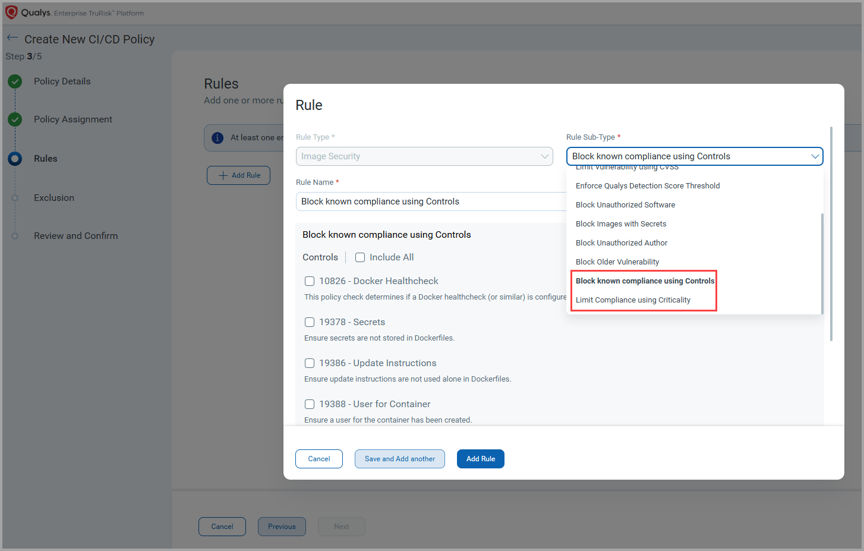
Until now, you could check compliance posture but not enforce it. Release 1.43 adds two new rule sub-types — Block known compliance using Controls and Limit Compliance using Criticality — so you can finally block or limit non-compliant images at the CI/CD gate and admission controller.
These new rules ensure that images violating defined compliance controls or criticality thresholds are blocked before they are deployed to production — giving teams a stronger, policy-driven enforcement model that aligns with their existing Qualys compliance frameworks, including:
- Block known compliance using Controls — blocks images that violate specific compliance controls aligned with Qualys frameworks.
- Limit Compliance using Criticality — defines acceptable thresholds based on compliance criticality to prevent risky images from getting deployed.
- Strengthens shift-left security by preventing non-compliant images from reaching production.
CIS Docker Compliance Enhancement
CIS Docker benchmark coverage has been upgraded to v1.7.0 and is no longer limited to Docker-only environments. The benchmark now applies to Containerd, Podman, and CRI-O runtimes as well — broadening compliance assurance across modern container runtime stacks.
This release expands CIS Docker compliance evaluation in the following ways:
- Upgraded to CIS Docker Benchmark v1.7.0.
- Expanded runtime support beyond Docker — now covers Containerd, Podman, and CRI-O.
- Consistent compliance evaluation across heterogeneous container runtimes.
- Helps customers using modern OCI runtimes meet the same CIS standards.
Runtime-Independent Compliance Scanning with QScanner
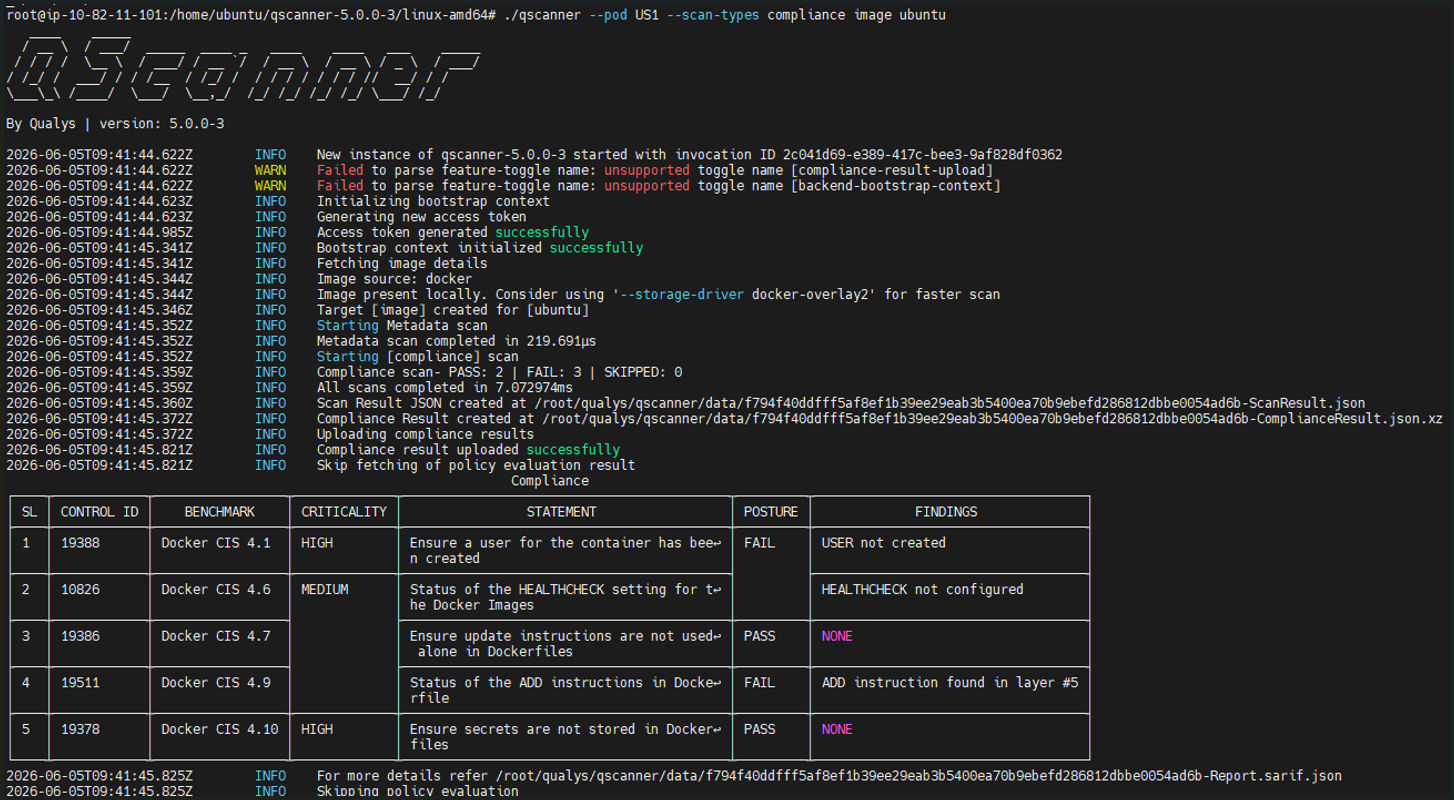
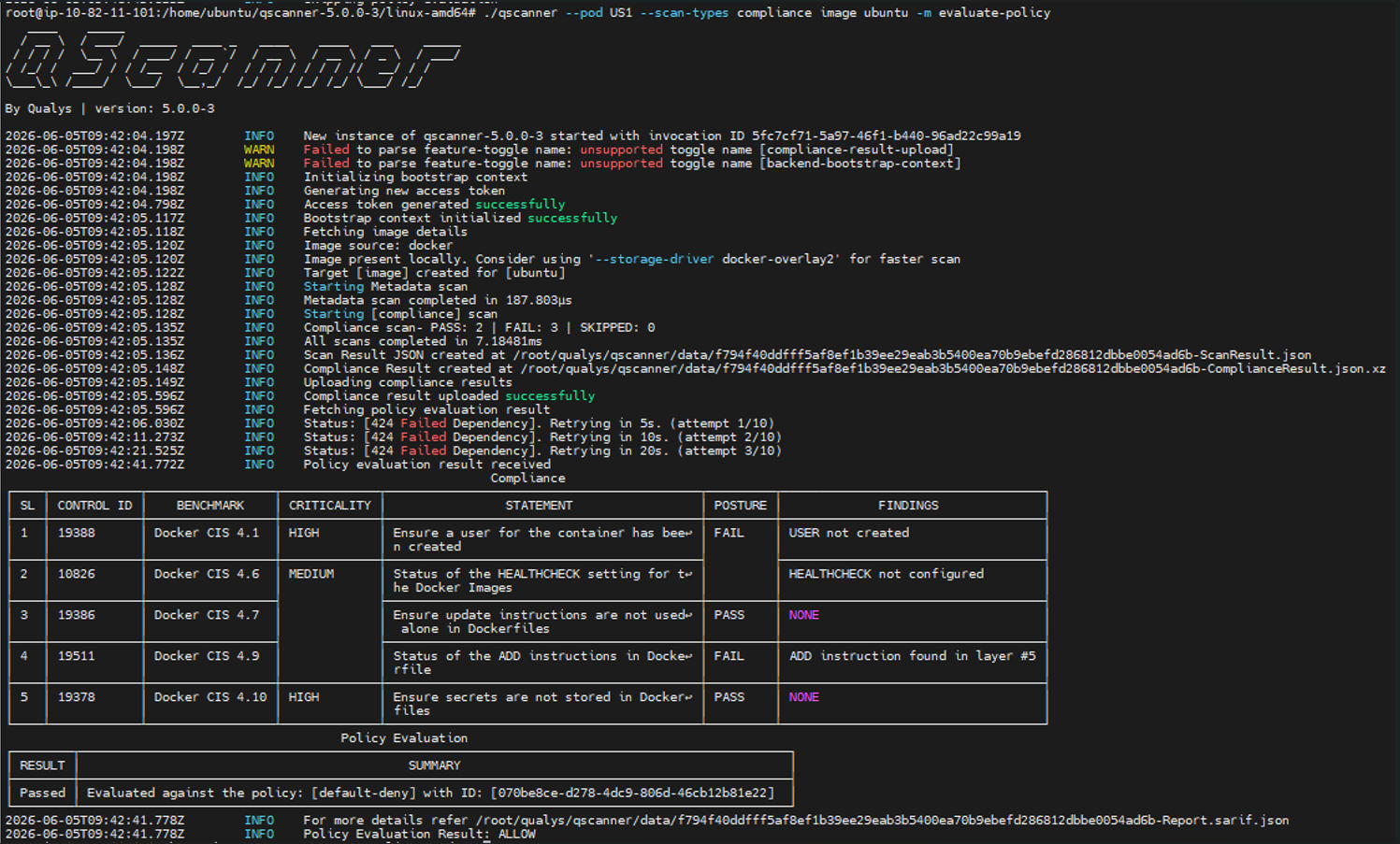
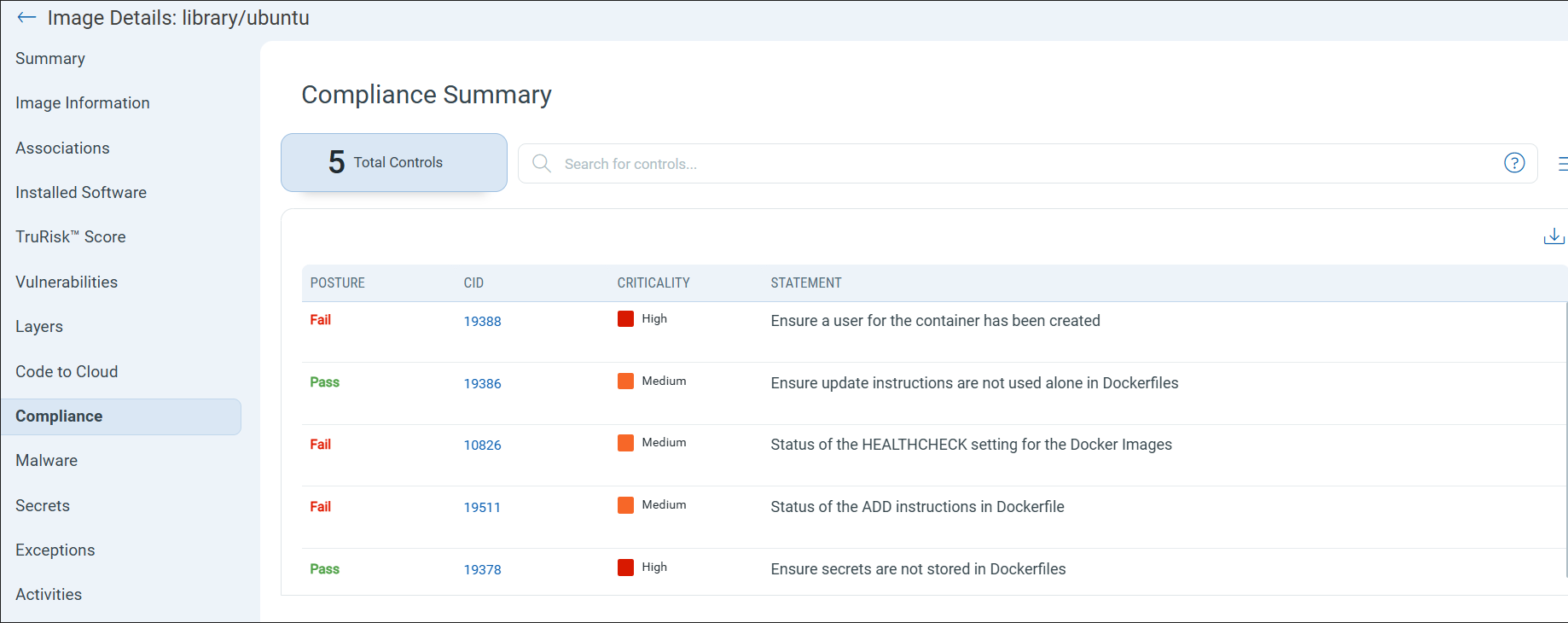
Previously, compliance scanning was tied to the CI/CD sensor and worked only on the Docker runtime. QScanner v5.0.0 changes both: compliance scanning is now available anywhere a developer can run QScanner, and independent of the container runtime — Docker, Containerd, Podman, CRI-O, or no runtime at all (remote images, air-gapped builds). Evaluation runs locally in QScanner against built-in controls, returning PASS / FAIL / NOT EVALUATED plus secret detection in image layers.
Here is what runtime-independent compliance scanning brings to QScanner:
- Powerful and flexible — evaluation runs on the QScanner side, enabling richer controls such as secret detection.
- Secret detection in image history — detects secrets in the Dockerfile and image layers using the same engine and rule file as secret scanning.
- Actionable findings — the findings section surfaces data points teams can use to remediate failing controls.
- Policy evaluation — compliance results can drive CI/CD policy decisions.
- Runtime independent — compliance scanning works for images on any runtime, and even for remote images, with no container runtime required.
- Air-gapped friendly — because evaluation does not rely on the backend, compliance scanning can run in fully air-gapped environments.
Run a static compliance scan on an image with:
./qscanner --pod US3 --scan-types compliance image <image-name>
EOL/EOS Reporting Enhancements
Software End Of Life (EOL) Report Templates
In 1.42, we introduced EOL/EOS reporting for images. Running end-of-life software in production is one of the most overlooked sources of risk in containerized environments — vulnerable, unsupported components often go unnoticed until they’re exploited.
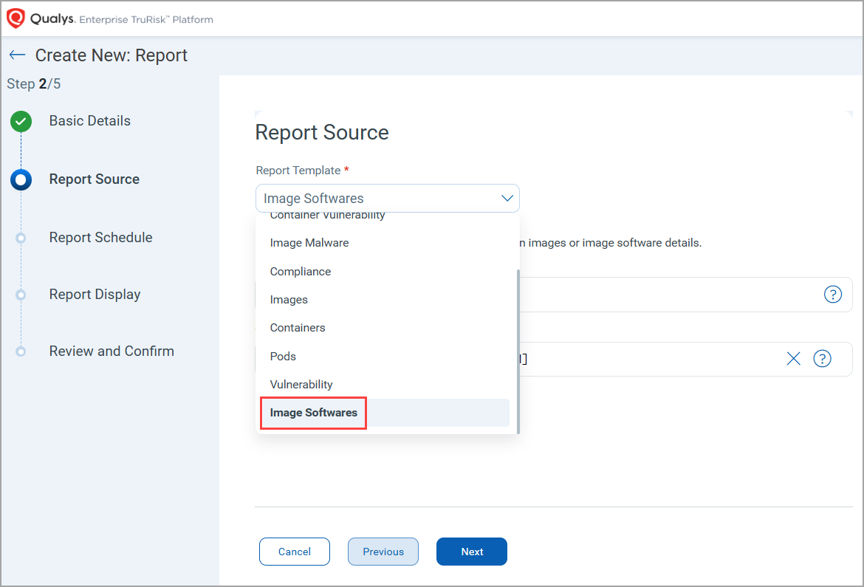
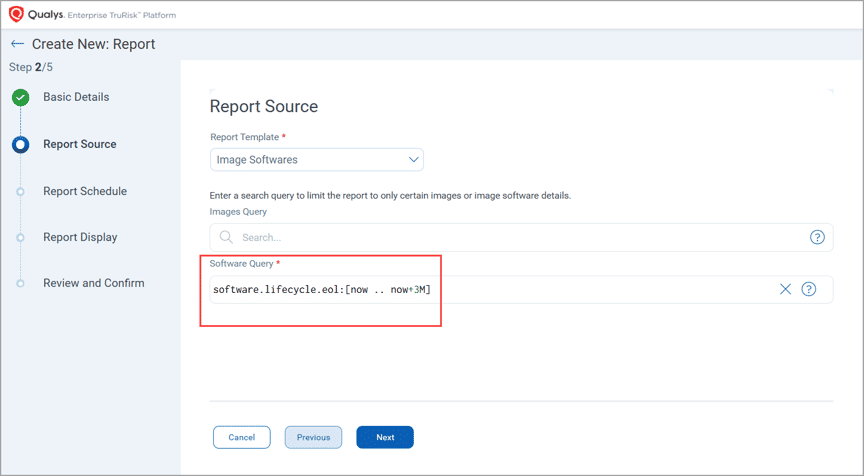
Release 1.43 introduces a new “Image Software” report template that puts software lifecycle risk front and center and can be used by your software management teams – just like they do using Qualys CSAM today – to now generate EOL/EOS reports for containers/images.
The report ships with a default QQL filter “software.lifecycle.eol: [now .. now+3M]” that reports any software reaching end of life within the next three months, helping teams act before unsupported components become a problem.
- New “Image Software” report template focused on software lifecycle risk.
- The default QQL filter highlights software reaching EOL within the next 3 months.
- Enables proactive identification and remediation of unsupported components.
- Help prioritize upgrades and replacements based on lifecycle data.
AI Workload & Supply Chain Protection
AI Software Detection for Images
As AI and ML workloads proliferate in containerized environments, security operations teams need a way to identify which images and packages contribute to their AI footprint. Release 1.43 introduces AI software detection across both images and the underlying software inventory, making AI-related risk visible at a glance.
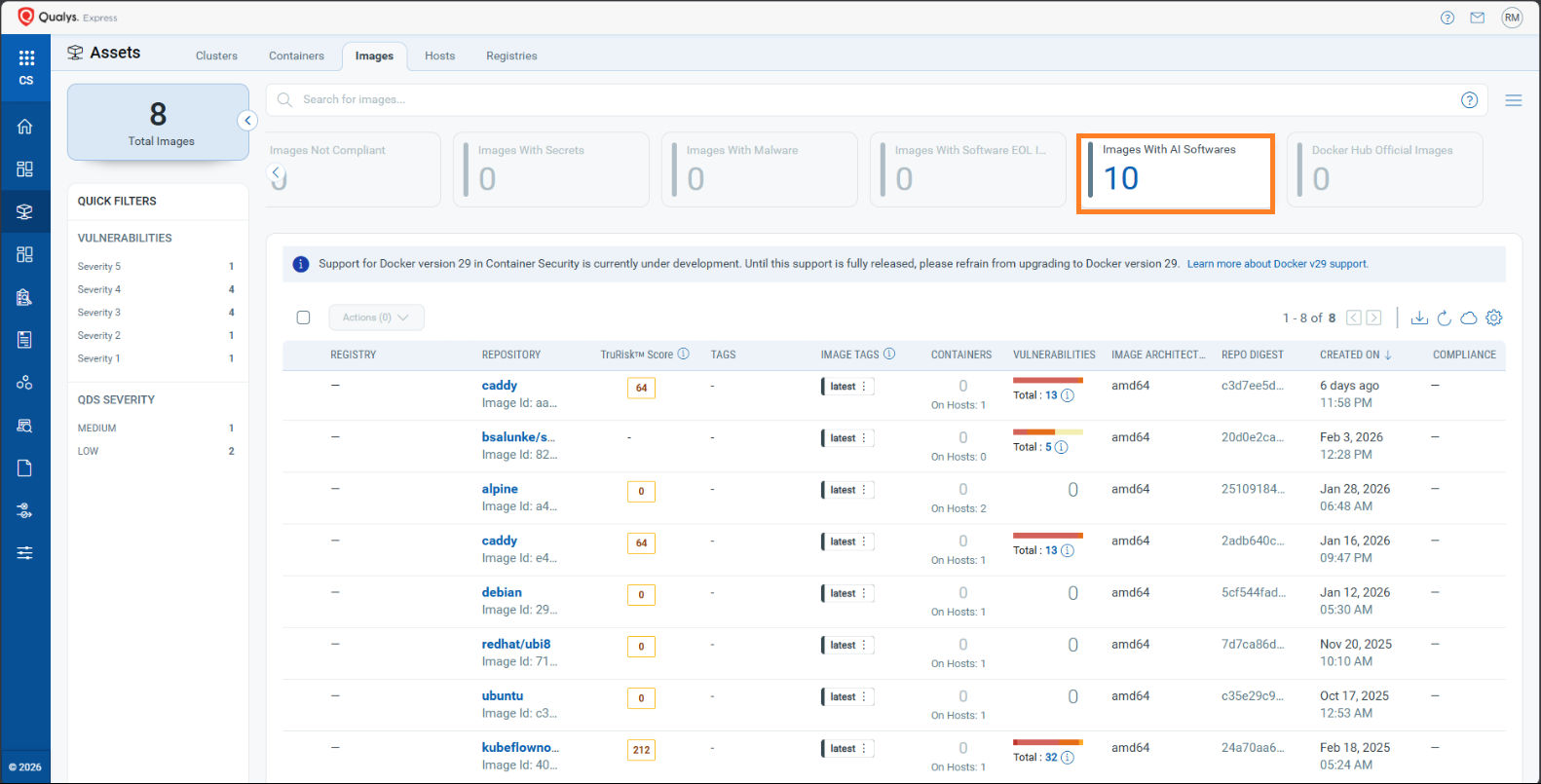
Detection is driven by the category data we receive from CSAM, so images and software packages associated with AI/ML categories are now automatically flagged. A new card in the Images view shows the count of images that contain AI software, and a new column in the Installed Software listing marks each package as AI or not.
Here is a quick look at what the new AI software detection capability brings to your image and software inventory:
- Images and software are automatically marked as AI-based on the category received from CSAM.
- The new “Images With AI Software” card in the Images view displays the number of images that contain AI software.
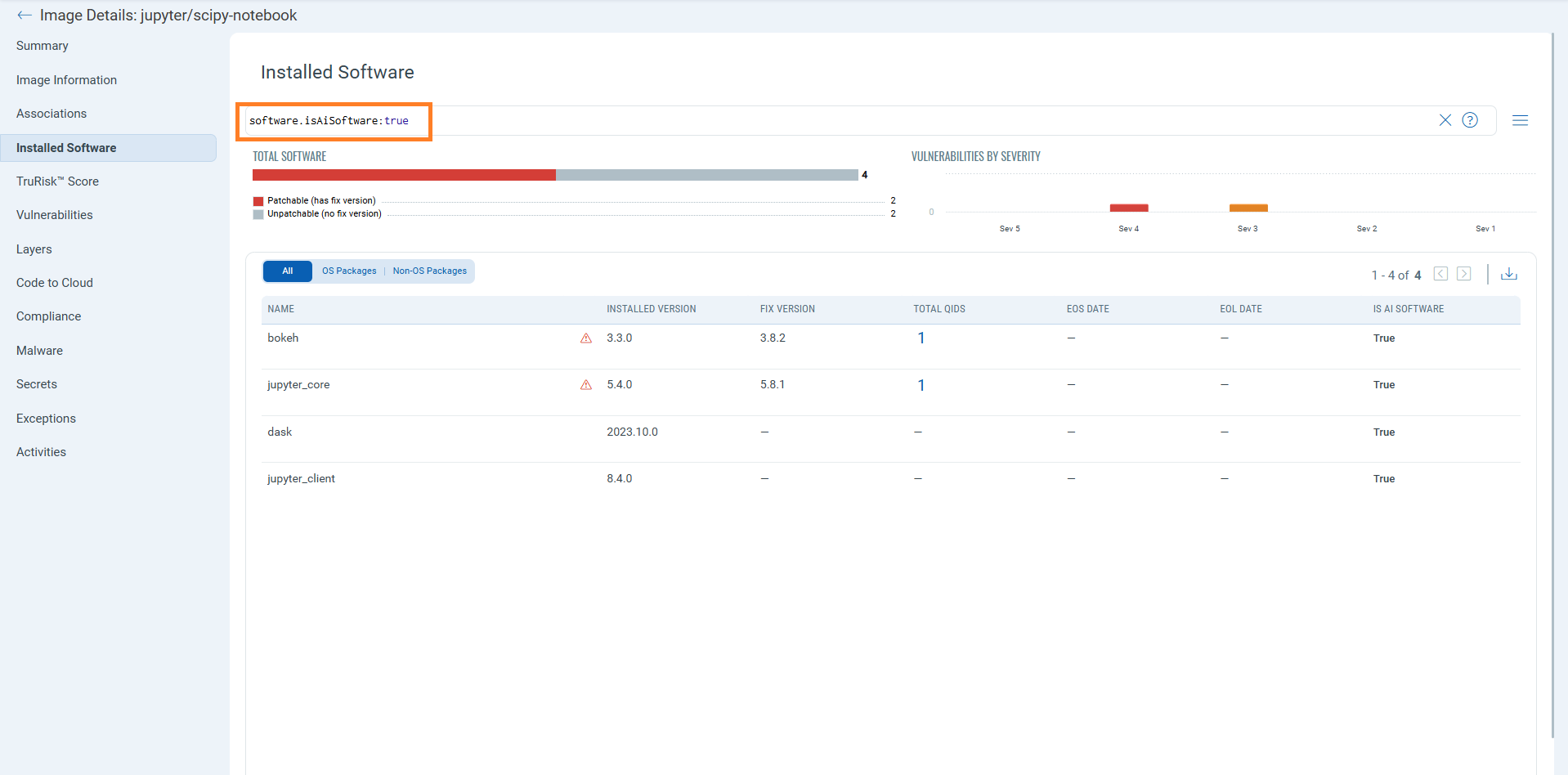
- The new “Is AI Software” column in the Installed Software listing flags each package as AI or not.
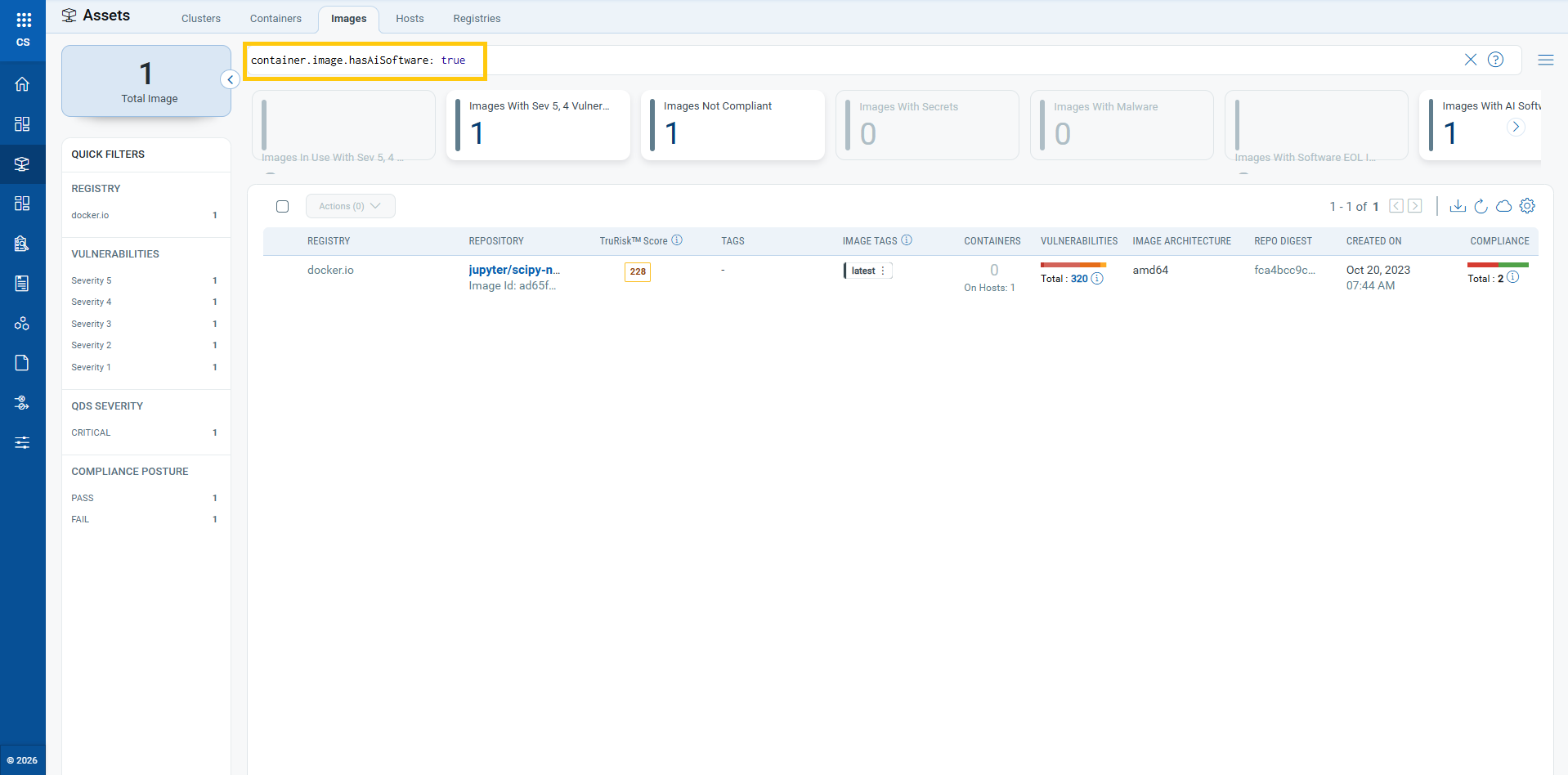
- New QQL support: filter images with container.image.hasAiSoftware:true and software with software.isAiSoftware:true.
- Helps teams quickly inventory and govern AI/ML workloads across the container estate.
MCP Server & Model File Detection
Identifying AI software is only half the story. Release 1.43 goes a step further by surfacing the underlying AI/ML model files and Model Context Protocol (MCP) servers that power AI workloads — giving security teams deeper visibility into how AI is actually deployed across images and running containers.
Three new QIDs power this visibility:
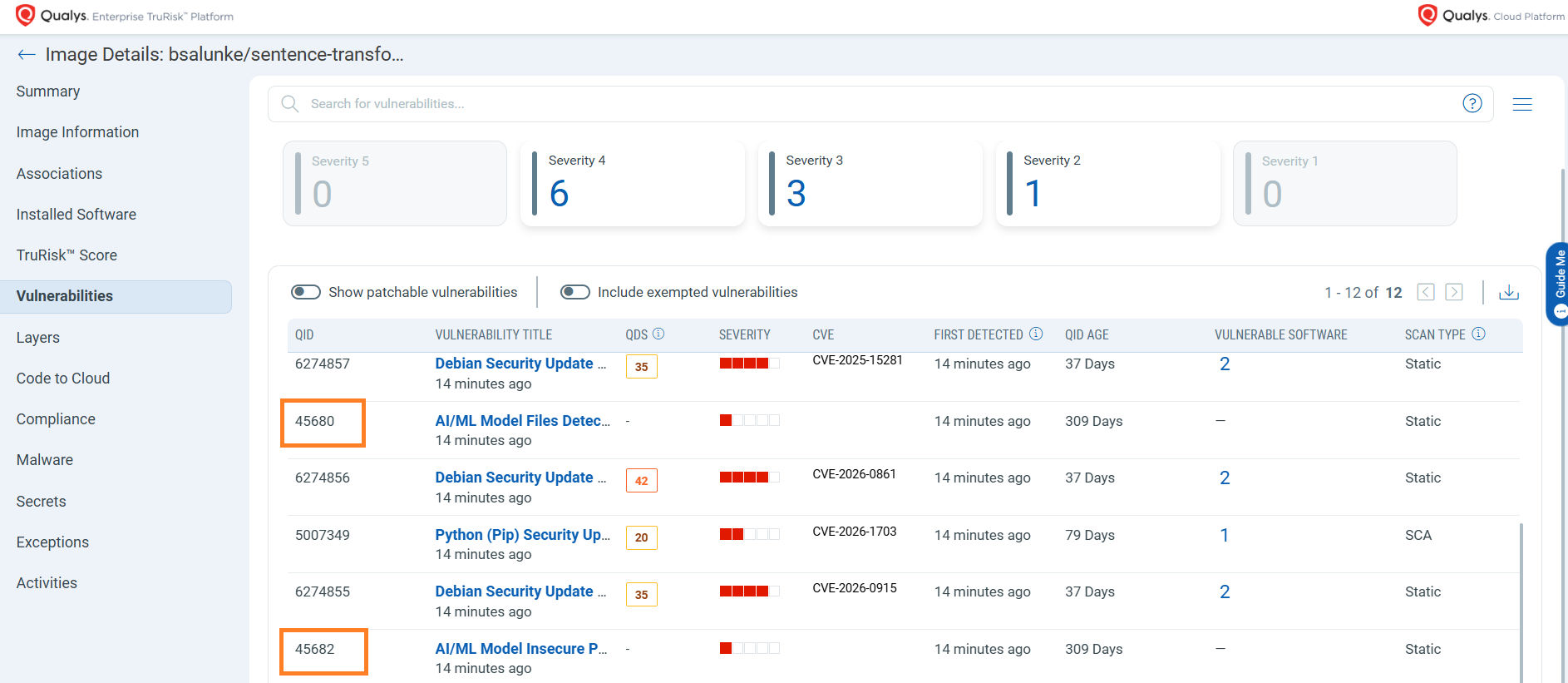
- QID 45680 — AI/ML Model Files Detected: Shows AI/ML model files present in an asset. This is a static scan detection method.
- QID 45682 — AI/ML Model Insecure Permissions Detected: Flags model files that are exposed through overly permissive access settings. Like QID 45680, this is a static scan detection method.
- QID 48288 — Model Context Protocol (MCP) Server Detected: Applicable to containers, this detection identifies active MCP servers by inspecting running processes, so you can see which workloads are actually exposing MCP endpoints.
Scanning and Sensor Management
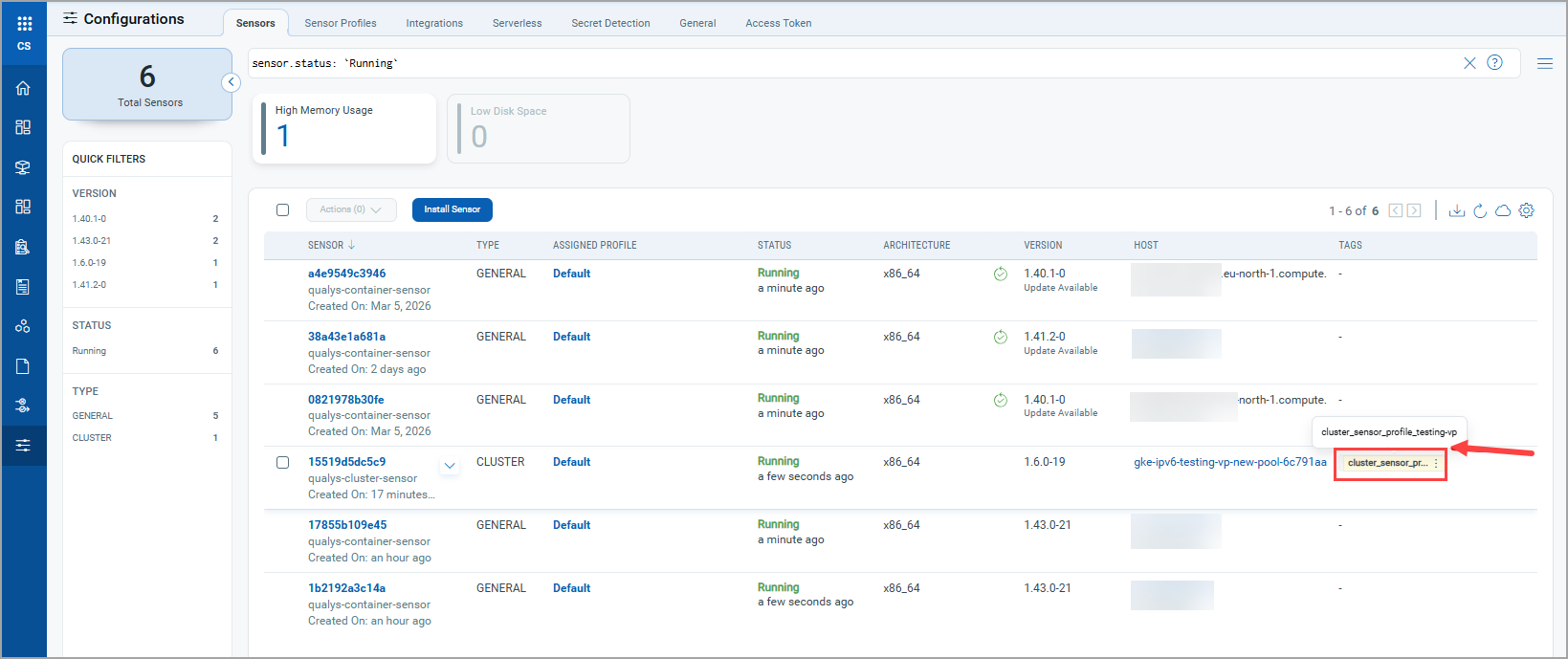
Automated Sensor Profile Assignment for Cluster and Runtime Sensors
Manually configuring sensor profiles across dynamic Kubernetes environments can be time-consuming and error-prone. Previously, tag-based sensor profile assignment was available only for General, Registry, and CI/CD Sensors (qcs). With Release 1.43, we are extending this capability to Cluster and Runtime sensors as well.
Now, sensors automatically inherit profiles matching specified special tags during installation — eliminating manual configuration steps and ensuring consistent policy enforcement, even as your environment scales. It addresses the following challenges,
- Automatic profile assignment for Cluster and Runtime sensors based on special tags.
- Reduces manual configuration and deployment efforts across large, dynamic clusters.
- Ensures consistent sensor configuration as new workloads are deployed.
- Streamlines onboarding for new environments with minimal operational overhead.
Multi-Architecture Image Scanning
Modern container ecosystems are increasingly heterogeneous — workloads run on x86_64, ARM64, and other CPU architectures, often from the same image manifest. Release 1.43 introduces support for multi-architecture (multi-arch) image scanning, enabling the Registry Sensor to scan container images that support multiple CPU architectures from a single image reference.
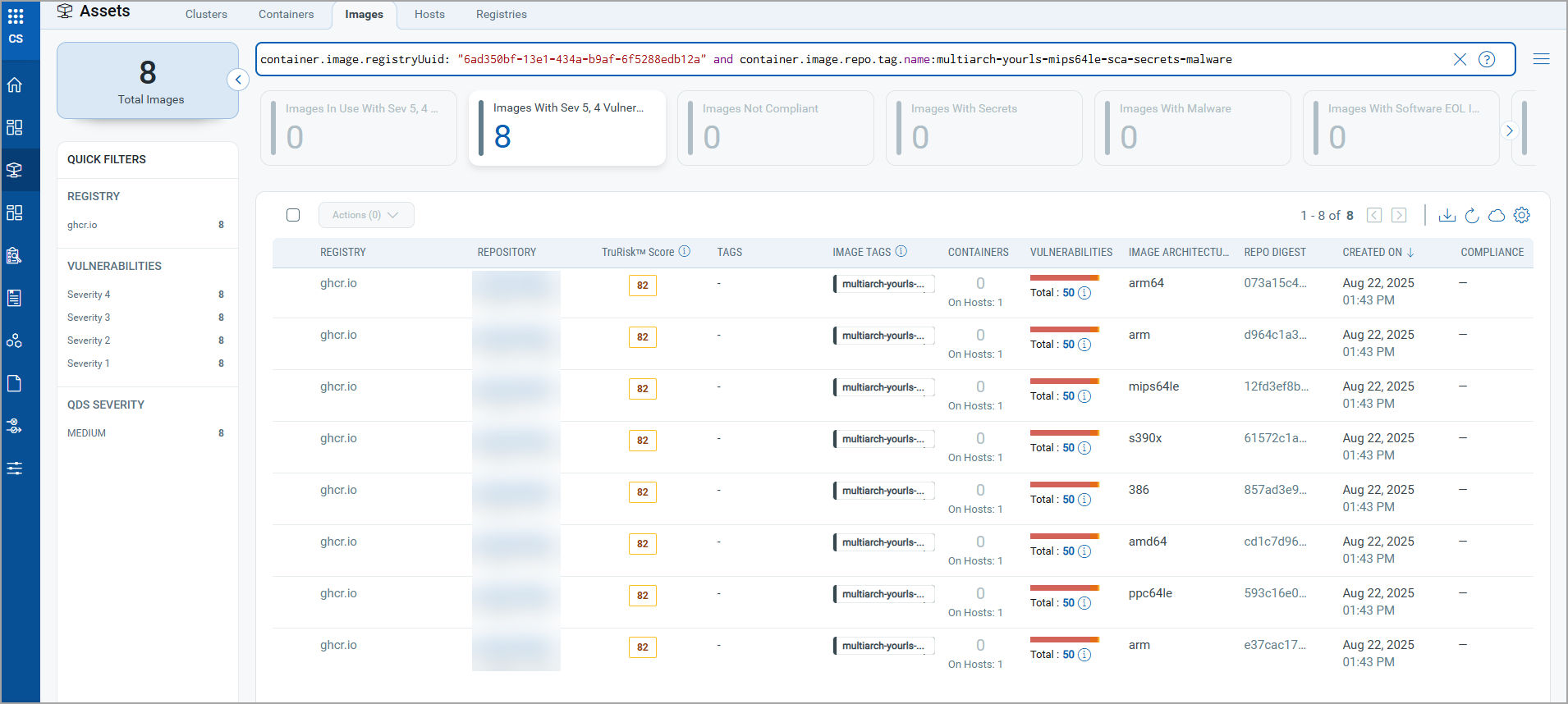
This capability is delivered through the Registry Sensor component (part of qcs-sensor) and is enabled by default. Scanned multi-arch images can be viewed in the Qualys Enterprise TruRisk Platform under Assets > Images.
Here is a quick summary of how multi-architecture image scanning works and what it brings to your container security workflows:
- Scans container images across multiple CPU architectures (x86_64, ARM64, and more).
- Enabled by default; no extra configuration needed to start scanning multi-arch images.
- View scanned images in the Qualys Enterprise TruRisk Platform under Assets > Images. You can refer to the sample QQL query as highlighted in the screenshot below, “container.image.registryUuid: “6axxxxxxxf-xxxx-xxxx-b9af-xxxxxxxxxxa” and container.image.repo.tag.name: multiarch-yourls-mips64le-sca-secrets-malware”
Reintroduction of Drift Detection + Runtime Container Scans via Lightweight Static Scanning
Previously, containers could only be scanned dynamically, a traditional Cloud Agent-style approach. In previous releases, we brought static scanning for images with a general sensor in Kubernetes environments. What that meant was that your runtime container posture was up to date, but dynamic Drift Detection was not present.
Release 1.43 now adds static scanning for the actual running containers themselves. The general sensor analyzes the container write filesystem and packages to identify software and vulnerabilities, and also provides drift detection, giving teams a faster, lower-overhead way to assess running containers using supported overlay storage and drivers.
With container static scanning, Release 1.43 delivers the following:
- New static scanning capability complements existing dynamic scanning.
- Powered by QScanner v5.0.0 — static container scanning now covers all scan types (OS, SCA, FileInsight, Secret, and Compliance), compared with VM-only coverage in traditional dynamic scans.
- Supported storage drivers:
- Docker: overlay2
- Containerd: overlayfs, and GCFS
- Lower runtime overhead compared to traditional dynamic scans.
- Note: Sensors running without an overlay storage driver are not supported for static scans.
To enable container static scanning on Containerd-based environments, the cssensor-containerd-ds.yml file has been updated with a new volume mount and a corresponding volume definition. Customers deploying or upgrading the sensor on Containerd should review their YAML to ensure these additions are in place.
The Qualys Container Security package includes the ‘cssensor-containerd-ds.yml’ file, which deploys the sensor in an environment with the Containerd runtime. This section explains the updates in the latest cssensor-containerd-ds.yml file. Refer to QCS Sensor Helm Chart (qcs-sensor).
| Flag/Entity | Status | Flag Location in cssensor-containerd-ds.yml | Description |
| – mountPath: /run/containerd name: containerd-fs-dir readOnly: true mountPropagation: HostToContainer | New | 157 to 160 | New volume mount supporting container static scan |
| – name: containerd-fs-dir hostPath: path: /run/containerd | New | 186 to 188 | New volume for container static scan |
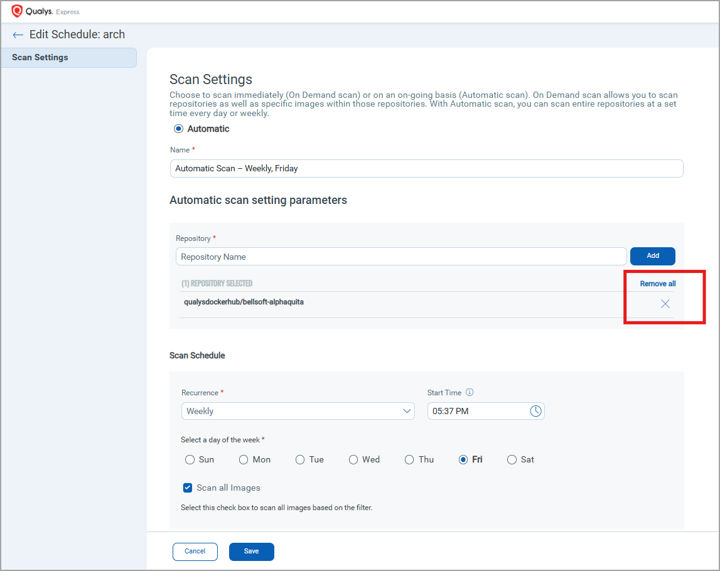
Exclude Certain Repositories from Automated Registry Scans
Not every repository in a registry needs to be scanned on the same cadence. Deprecated, archival, or low-priority repositories can clutter scan results and unnecessarily consume resources. Release 1.43 gives you finer control by allowing you to selectively exclude specific repositories from your automatic scan schedules.
This makes it easy to focus scanning effort where it matters most, keeping high-value repositories on schedule while excluding the ones you no longer need to track.
Custom Registry Support for Java DB
QScanner runs in online scan mode by default and periodically downloads the Java DB — used to identify the Group ID, Artifact ID, and Version of JAR files — from public OCI registries. Organizations with restricted networks or air-gapped environments need control over where that database comes from.
QScanner v5.0.0 lets you choose which Java DB repositories are used and lets you point QScanner at a custom registry. By default, only the GitHub Container Registry (ghcr) is used; the QSCANNER_ENABLED_JAVADB_REPOS environment variable overrides this, and QSCANNER_CUSTOM_JAVADB_REPO defines a custom registry path. If a download fails, QScanner falls back to offline mode with a warning.
Here is what custom Java DB registry support brings:
- Selectable repositories — ghcr, aws (public.ecr.aws), docker (docker.io), and custom, tried in the order you specify.
- Network whitelisting — selectively allow access only to the registries that match your organization’s policies.
- Custom registry support — host the Java DB in your own registry for offline and air-gapped environments.
- Configurable refresh — QScanner attempts a Java DB update every 15 days (adjustable via –java-db-update-interval).
Enable multiple repositories, or point QScanner at a custom registry:
# Try multiple registries (in order) for Java DB downloads
export QSCANNER_ENABLED_JAVADB_REPOS=ghcr,aws,docker
# Copy Java DB into a custom registry (repeat periodically to keep it current)
oras cp ghcr.io/aquasecurity/trivy-java-db:1 \
art-hq.intranet.qualys.com:5001/qscanner/java-db:1
# Point QScanner at the custom registry
export QSCANNER_CUSTOM_JAVADB_REPO="art-hq.intranet.qualys.com:5001/qscanner/java-db:1"
export QSCANNER_ENABLED_JAVADB_REPOS=custom
Note: When using a custom registry, the customer is responsible for periodically syncing the Java DB to that registry to keep it up to date.
Other Enhancements
Enhanced Grouping By Namespace On Clusters Page
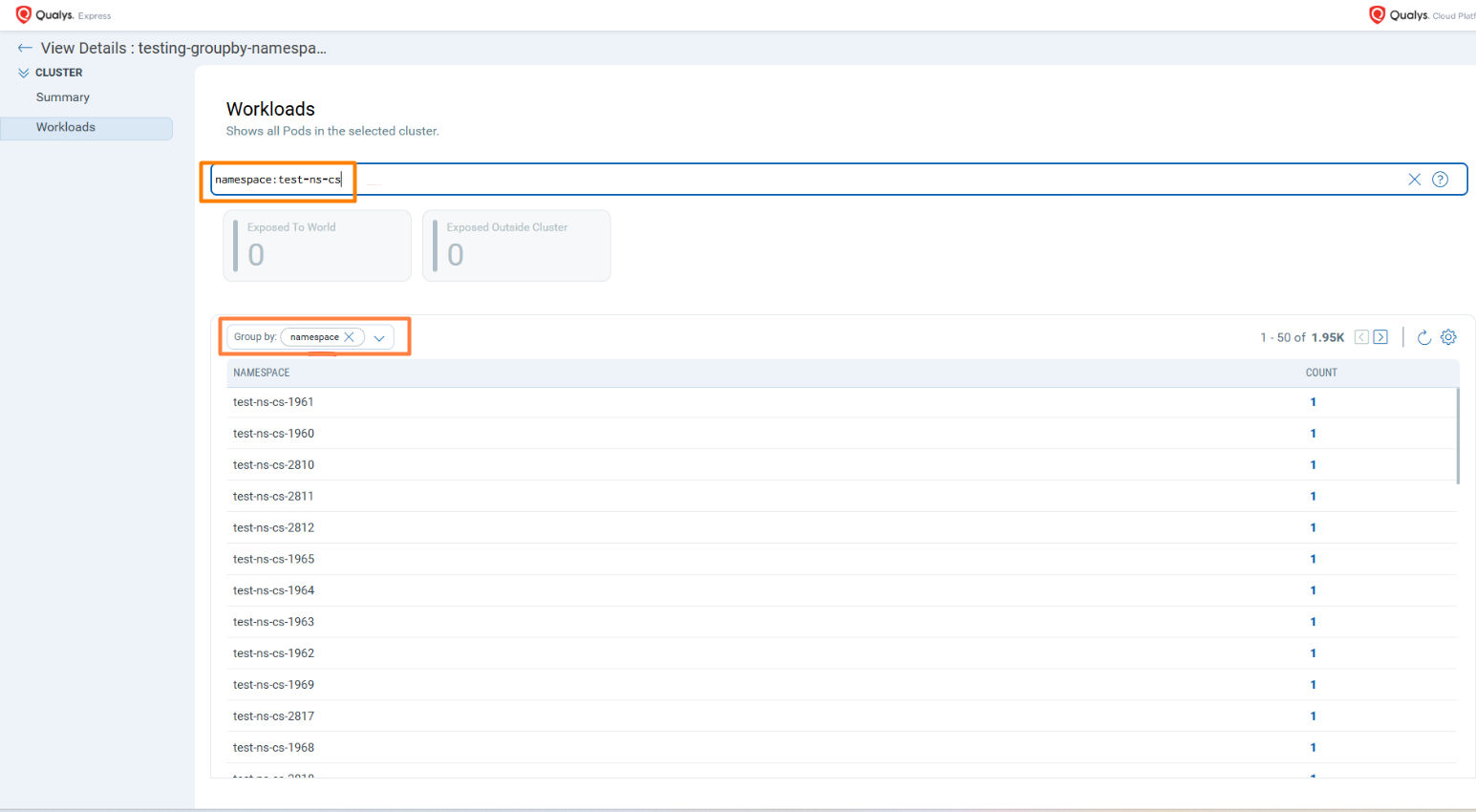
Customers operating large Kubernetes clusters often have thousands of namespaces, but the CS-UI previously displayed only the first 200 namespaces from a cluster in the namespace dropdown. Any namespace beyond that limit was effectively invisible in the UI, making it difficult to drill into specific workloads at scale.
Release 1.43 enhances namespace handling in the CS-UI by introducing support for grouping results by namespace and significantly increasing the namespace retrieval limit — ensuring better scalability and usability for large clusters while maintaining UI performance.
Here is what the enhanced namespace handling brings to large-cluster workflows in the CS-UI:
- Results can now be grouped by namespace, with up to 2000 namespaces retrieved per cluster (up from 200).
- For clusters containing 2000 or fewer namespaces, all namespaces are displayed in the dropdown.
- For clusters exceeding 2000 namespaces, users can still access any specific namespace using QQL search — for example, namespace:<namespace-name>.
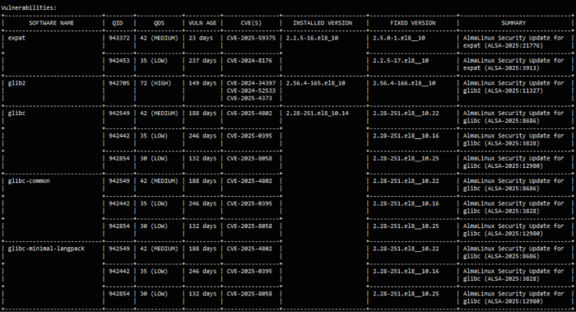
QDS Severity in Tabular Reports
As customers transition from CVSS to the Qualys Detection Score (QDS), a raw QDS value alone can be hard to interpret — especially for teams not yet familiar with the scoring model.
QScanner v5.0.0 enhances tabular vulnerability reports by showing a QDS Severity alongside the QDS score. Because the backend vulnerability report does not include a score-to-severity mapping, QScanner derives severity itself, giving teams an at-a-glance view of risk and producing cleaner, easier-to-scan tabular reports.
Here is what the reporting enhancement delivers:
- QDS Severity is now displayed alongside the QDS score in tabular reports.
- Eases the transition from CVSS to QDS by presenting a familiar severity label.
- Cleaner, more readable tabular reports overall.