
Explore the Enhanced AI-Powered Customer Experience

Executive Summary
We have launched an enhanced, Generative AI-powered customer experience that delivers insightful, step-by-step answers, multilingual search, screenshot-based analysis, and real-time case tracking. This is woven into every search experience, for guests and authenticated users alike, with advanced capabilities reserved for authenticated customers.
Overview
Every customer interaction starts with a question. Historically, getting from question to resolution meant digging through documentation, scanning knowledge base articles, or filing a ticket.
Qualys has enhanced the experience with a Generative AI assistant that helps customers quickly find answers and resolve issues. Whether evaluating Qualys products, learning through training content, or actively managing enterprise security operations, customers receive contextual guidance tailored to their needs. The result is a unified, intelligent experience that reduces friction, accelerates resolution, and scales across global teams.
What Guest Users Get
Even without signing in, users can ask questions in natural language and receive a synthesized answer instead of a list of search results to sift through.
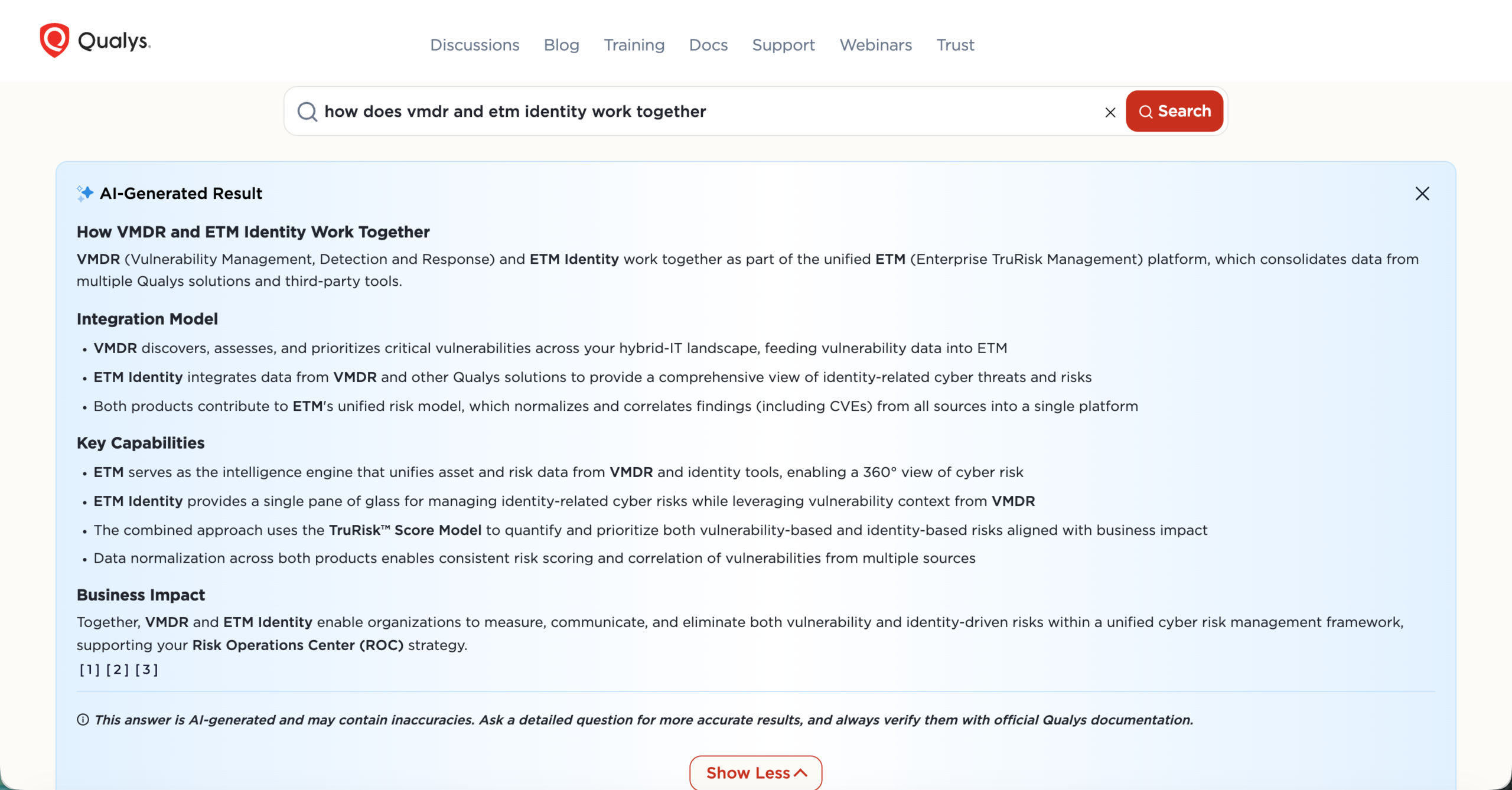
A query like ‘How does VMDR and ETM Identity work together?’ doesn’t just return a list of matching articles. It delivers an AI-generated answer that explains how the two solutions connect within the ETM platform, outlines their shared capabilities, and highlights the business value of managing vulnerability and identity risk together, pulled together from across Qualys’s content rather than scattered over multiple documents.
Users can search in French, German, Japanese, and many other languages and receive GenAI-powered answers in those same languages, making the experience far more accessible for global teams. They can then explore results through a tabbed interface spanning all content types, including Blogs, Training, Docs, KB Articles, and Webinars, so they can get to the right answer faster without digging through separate silos.
What Authenticated Users Get
When customers log in to their Qualys subscription and click Contact Support, they get access to a richer support experience, including an intelligent search bar and the AI chatbot, ‘Ask Support’.
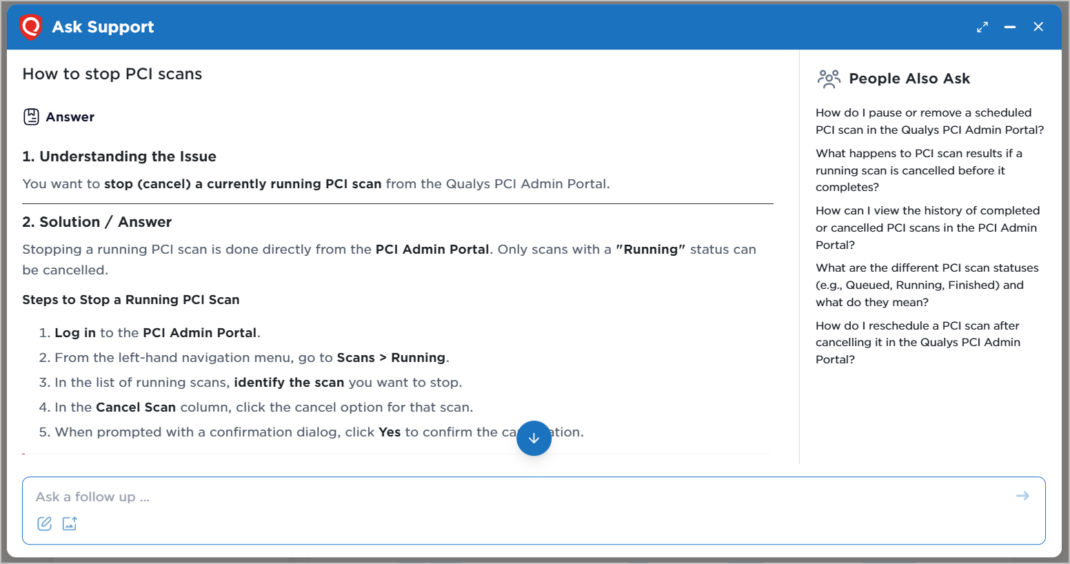
Ask Support chatbot handles natural-language questions and structures its responses into clear sections (typically ‘Understanding the Issue’ and ‘Solution/Answer’) rather than dumping a wall of text.
Customers can also attach a screenshot of an error, and the assistant will identify the issue and return a detailed explanation with troubleshooting steps. This cuts out much of the back-and-forth that typically comes with describing an error in words. Also, customers can access the ‘People Also Ask’ panel in the chatbot, which surfaces related questions based on the query entered, often reflecting what other customers ask as well.
Case Management, Simplified
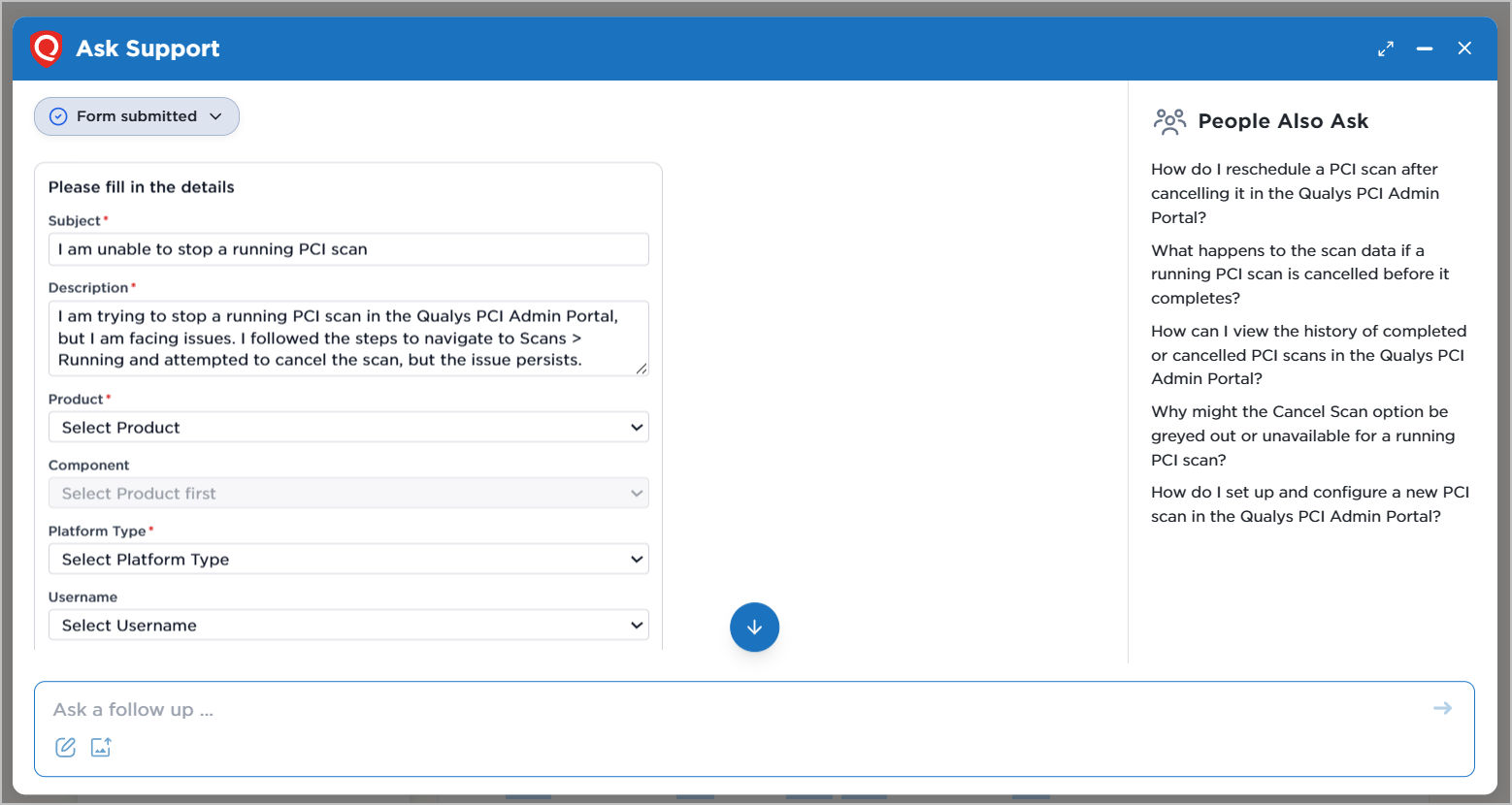
Create a new case: If customers are unable to get the right answers, they can raise a support case or connect with a live agent. While creating a case, the chatbot automatically pre-fills the subject and description based on the conversation, eliminating the need to re-enter information that has already been provided.
Look up an existing case: Customers can track existing support cases directly within the chatbot by entering the case number. The chatbot displays key details such as case status, severity, scheduled calls, time zone, and a summary of recent comments, without requiring navigation elsewhere in the portal.
Get smart recommendations: Beyond the chatbot, customers can submit issues through the dedicated case submission page, which includes conversational search and assistant support. After entering basic case details such as the Subject, Product, and Description, relevant search results and recommendations are automatically generated, providing step-by-step troubleshooting guidance based on the reported issue.
If the suggested solutions don’t resolve their concern, customers can proceed with case submission. The information and context they have already entered are automatically carried forward into the support case form, making the submission process faster and more seamless.
Why It Matters
The value isn’t in one flashy feature; it’s in addressing friction throughout the customer journey. Customers get faster answers for common issues. Underneath all of this is a better content experience: years of blogs, product documentation, KB articles, and webinars that once lived in separate silos are now surfaced as a single, synthesized answer instead of a list of links to sift through.
Additional capabilities are on the way, so this launch marks the beginning of a broader experience.
Explore the Enhanced Experience
Discover a faster, more seamless AI-powered Qualys Customer Experience built for speed and precision. Visit Customer Support to get started.
Frequently Asked Questions (FAQs)
Who can access the Qualys Generative AI-powered customer support?
Both guest users and logged-in Qualys customers can access it. Guest users can use the AI-generated search, advanced filters, multilingual support, and multi-content tabs. Logged-in users can access enhanced search capabilities and the AI support chatbot, featuring screenshot upload and analysis, transfer to a live agent, automated case creation, smart suggestions, and case status tracking.
Which languages are supported for GenAI search and Ask support chatbot?
The enhanced search experience, along with the Ask Support chatbot, supports multiple languages, including French, German, Japanese, and many more. Both the main search bar and the AI support chatbot accept queries in these languages and return results in the same language, allowing users to engage with support content in the language they are most comfortable with.
How does screenshot upload work in the Qualys support chatbot?
Logged-in users can upload a screenshot directly to the Ask support chatbot interface via the image attachment button below the search bar. The chatbot analyzes the image, identifies the errors or relevant conditions displayed, correlates those with Qualys support knowledge, and returns a structured troubleshooting response. This reduces the time typically required to diagnose visual or interface-specific issues.
Can I create a support case without leaving the chatbot?
Yes. If a new support case needs to be created, the case creation form appears within the chatbot conversation. Key fields such as the subject and description are pre-populated based on the query and chat history. Customers can also create cases from the enhanced case submission page, where smart suggestions and search results appear based on the product selected, giving users a self-service option before submitting a ticket.
How are users routed to the right live support agent?
When a customer requests live assistance, the chatbot uses conversation context to determine the type of support needed and route the request to the appropriate agent.
What happens to the information I enter in the chatbot when I submit a case?
All relevant information entered during a chatbot conversation, including the subject, description, and any contextual details, is automatically carried over to the case submission form. Customers do not need to re-enter information that the system has already captured during the interaction.
Where can I track the status of an existing support case?
Logged-in customers can track case status directly within the Ask Support chatbot. By entering a case number, the chatbot returns a structured summary that includes the current status, latest comments, etc.