

RBAC 2.0 Brings Centralized Access Management to the Qualys Enterprise TruRisk™ Platform

Table of Contents
- A Centralized Home for Users and Roles
- Map Roles Precisely to Responsibilities
- Configure Granular Permissions with Confidence
- Bring Identity and Automation into the Same Workflow
- Align Qualys Access with Microsoft Entra ID
- See Sensitive Account Changes with More Context
- Keep Account Lifecycles Current by Policy
- Find Users, Roles, and Activity Faster With QQL
- What RBAC 2.0 Means for Your Organization
- What Existing Qualys Users Should Know
- Complete the following steps to migrate your subscription to RBAC 2.0
- Rollout timeline and how to plan your transition
As organizations grow, access management has to keep pace with changing teams, responsibilities, and security requirements. Administrators need precise controls without adding unnecessary complexity to everyday user and role management.
RBAC 2.0 brings role-based access control, user administration, granular permissions, identity workflows, and account activity into a centralized experience on the Qualys Enterprise TruRisk™ Platform. Organizations are able to manage access in a more consistent way as they scale, while maintaining clear, repeatable workflows across users and roles.
RBAC 2.0 includes:
- Centralized user and role management
- Dedicated privileged roles
- Granular permission controls
- Identity and automation workflows
- Greater visibility into sensitive account changes
- Policy-based inactive account management
- Expanded Qualys Query Language (QQL) search and filtering
Watch The RBAC 2.0 Walkthrough to See the New Administration Experience in Action
A Centralized Home for Users and Roles
RBAC 2.0 brings user and role management together in the Administration module. Administrators can create users, assign roles, configure permissions, and review account details within one workflow. The supporting product materials describe centralized views for user roles, modules, business units, account status, and related access information.
The centralized experience includes:
- View Super User information from the Users page.
- Access applicable configuration settings for eligible Administrator and Super User accounts.
- Manage User Groups through designated privileged roles.
- Maintain a read-only default Administrator role, so baseline permissions remain stable and auditable.
This model gives administrators a consistent place to manage access as teams and requirements evolve.
Map Roles Precisely to Responsibilities
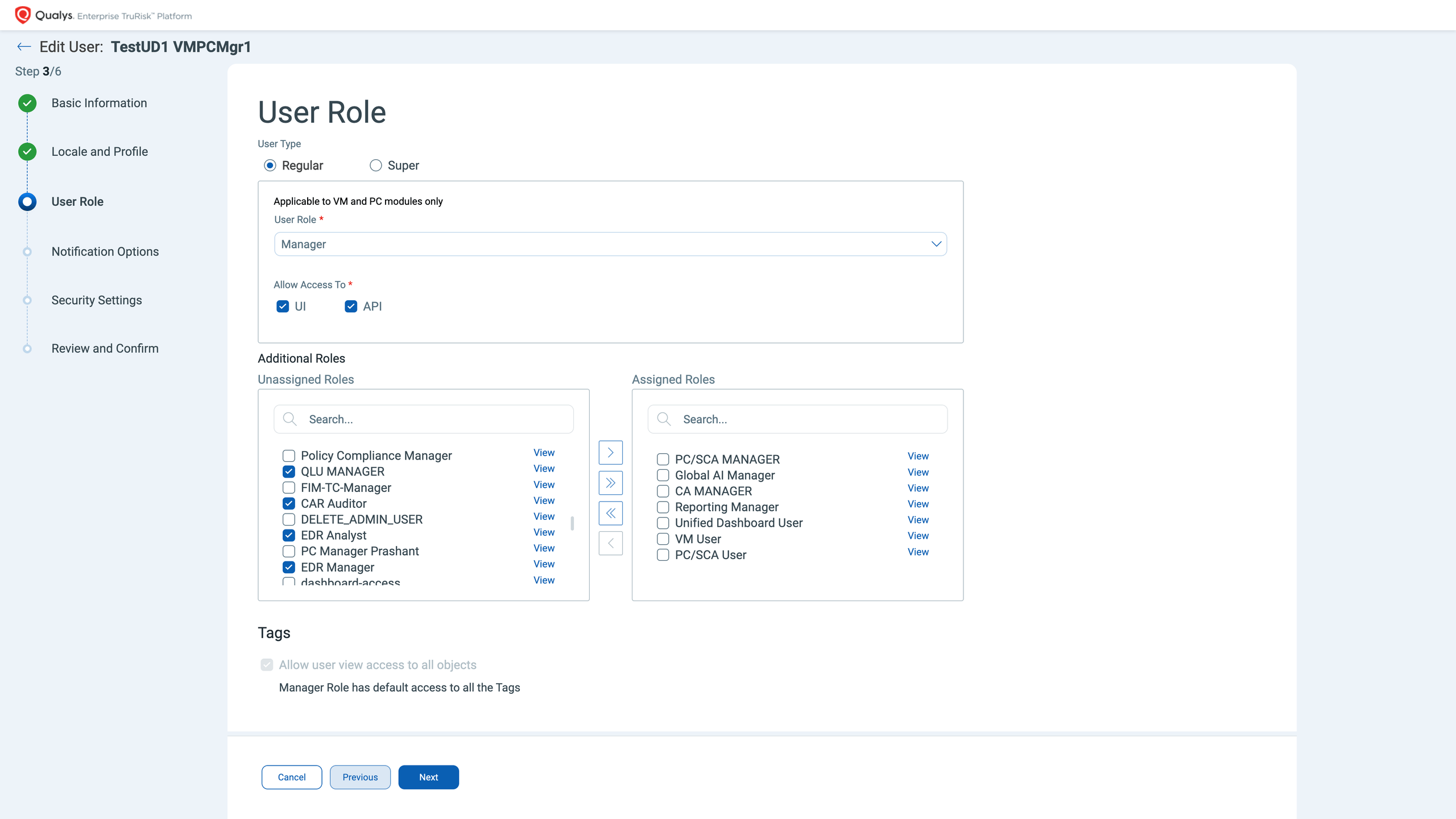
Access often reflects more than one responsibility. RBAC 2.0 lets administrators layer roles together, so access maps precisely to a person’s work. Administrators can assign a primary role plus multiple additional roles from the same user management workflow with no separate configuration step. That gives teams flexibility to support multiple responsibilities while keeping each person’s access precisely scoped.
RBAC 2.0 also introduces distinct privileged roles:
| Role | What it’s for |
| Administrator Role | Supports user, role, and key administrative management. |
| Super User Role | Provides subscription-wide access for designated users ensuring break-glass continuity. |
| Dedicated VM and PC Manager Roles | Support clear separation between vulnerability management and policy compliance responsibilities. |
The underlying RBAC materials also describe centralized role creation and configurable permissions by application, along with UI and API access settings.
Configure Granular Permissions with Confidence
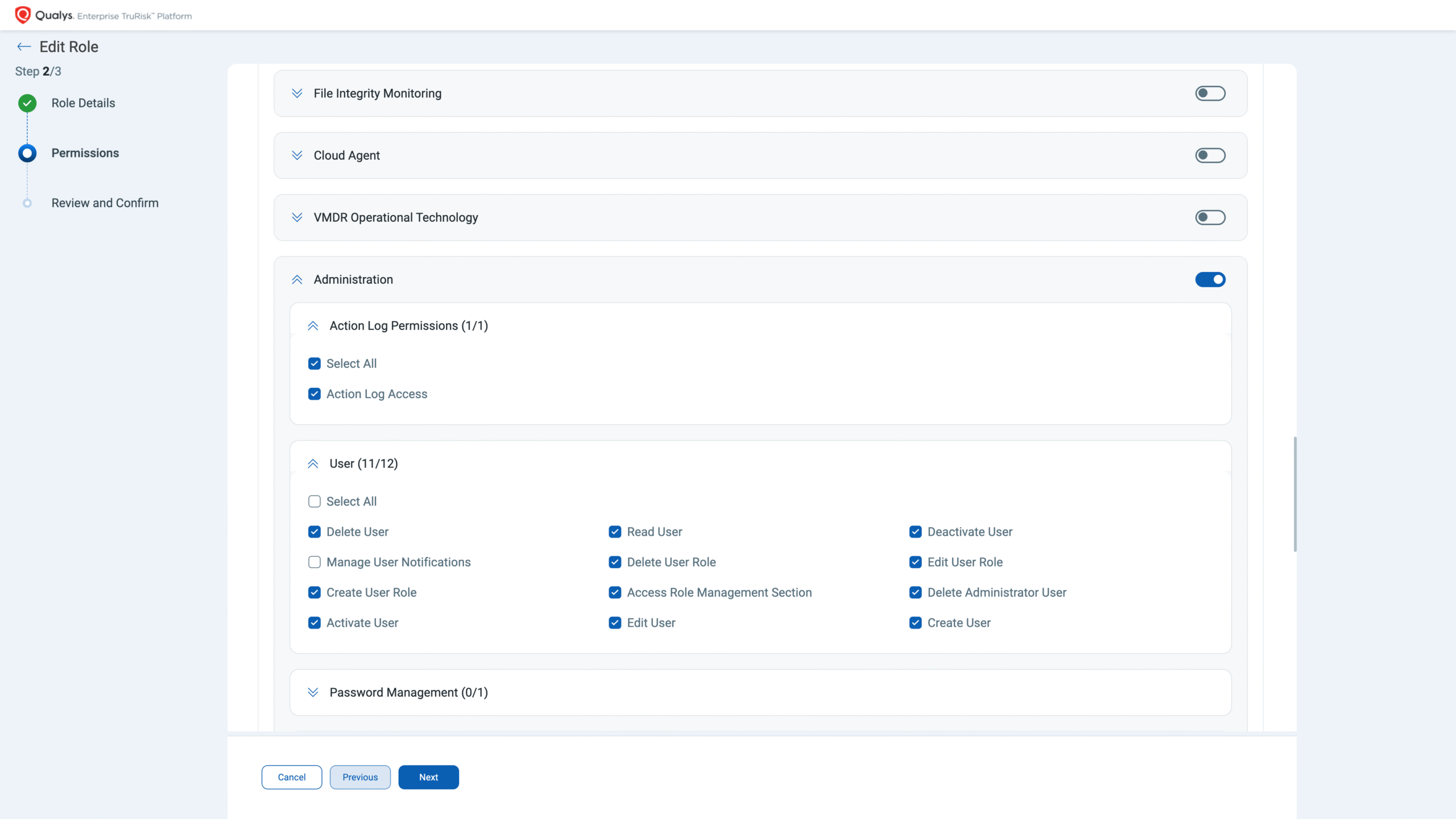
Granular access works best when administrators can configure it consistently. RBAC 2.0 adds permission controls that make those decisions clearer and easier to manage.
Administrators can:
- Use automatic permission dependency management to maintain valid permission combinations.
- Apply self-modification protection, so role changes go through an authorized administrator.
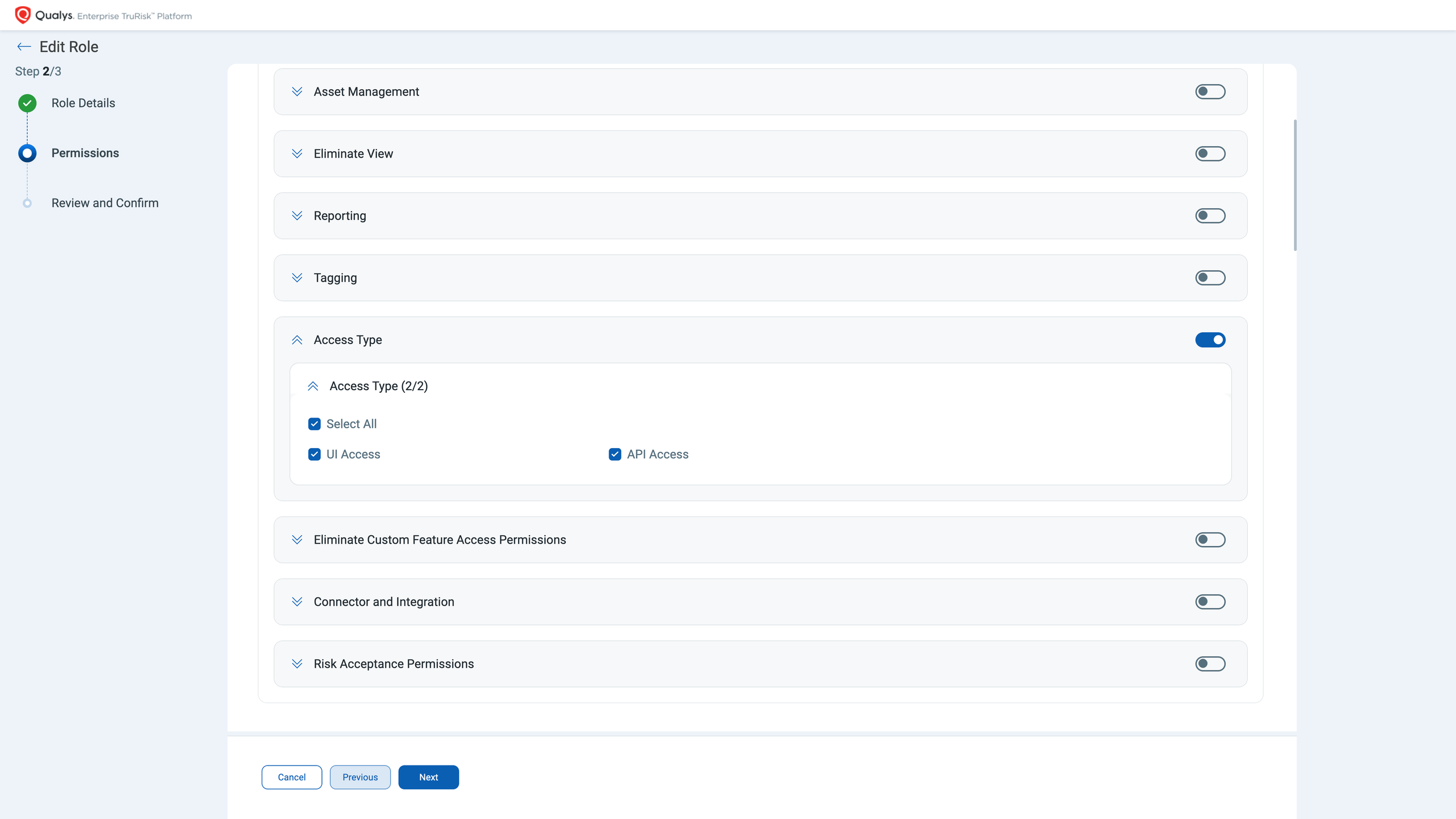
- Configure global UI access and API access separately.
- Find product-specific API permissions in a more organized structure.
The product walkthrough shows permissions grouped into global and module-level categories, helping administrators align capabilities with a user’s responsibilities. These controls support precise access decisions while giving administrators a repeatable way to manage permission combinations.
Bring Identity and Automation into the Same Workflow
Access administration extends beyond individual users. It also involves applications, APIs, identity systems, and authentication settings. RBAC 2.0 brings more of these workflows into the Administration experience for a more consistent administration model across identity and access settings.
Administrators can:
- Manage Auth ID clients directly from Administration.
- Configure user-level and subscription-level clients with capabilities scoped to each client type.
- Manage modules, global permissions, dashboard permissions, tagging permissions, and API access within a common workflow.
- Apply mandatory External ID requirements for applicable SAML single sign-on configurations, e.g., SAML SSO enabled for a non-SAML user.
Align Qualys Access with Microsoft Entra ID
Microsoft Entra ID Sync is designed to help keep users, groups, and role assignments aligned with directory changes. Administrators get a structured way to connect identity lifecycle processes with Qualys access management.
Microsoft Entra ID integration supports:
- User creation, updates, and deactivation based on directory changes
- Reusable User Groups for roles, permissions, scope, security settings, and notifications
- Mapping between Microsoft Entra ID groups and Qualys User Groups
- Incremental synchronization after the initial full sync
- SAML-enabled access through a consistent unique identifier
See Sensitive Account Changes with More Context
Sensitive account changes are easier to review when administrators can see both the event and its context. RBAC 2.0 provides notifications for changes, including email updates, privilege escalation, deactivation, reactivation, and account deletion.
Administrators can also see information such as:
- The affected user
- Previous and updated values
- Who made the change
- When the change occurred
Activity Logs add filtering by user status, while a QQL client token can distinguish browser activity from API activity. The product walkthrough shows Activity Logs as a centralized record of administrative activity, with information about who performed an action, when it occurred, and which module was affected. Together, these capabilities provide a clearer record for governance, investigation, and audit workflows.
Keep Account Lifecycles Current by Policy
Access hygiene becomes more complex as teams grow, and roles change. RBAC 2.0 keeps account lifecycle management current through configurable policy rather than manual tracking.
Administrators can:
- Set an inactivity threshold based on days without login activity.
- Keep Super Users outside automatic deactivation policies when continuity requires it.
- Send reminder notifications before an account is deactivated.
- Reactivate an account while preserving its existing user data.
These controls help organizations maintain consistent account lifecycle practices while keeping administrative decisions under defined policy.
Find Users, Roles, and Activity Faster With QQL
Larger environments can contain extensive lists of users, roles, User Groups, and administrative events. Expanded QQL tokens give administrators more ways to narrow those results.
Administrators can search and filter:
- Users by tags, modules, permissions, External ID, last login date, update date, and User Group
- Roles by module or permission
- User Groups by name, creator, or updater
- Activity Logs by browser or API source
These filters help administrators move from broad lists to the relevant user, role, or event more efficiently.
What RBAC 2.0 Means for Your Organization
RBAC 2.0 changes where administrators manage users, roles, permissions, and related access settings by bringing those workflows into the centralized Administration experience. Centralized management helps administrators apply access policies predictably. Granular controls help keep permissions aligned with individual responsibilities. Lifecycle and activity capabilities add visibility as users and organizations change.
Together, these capabilities give security and IT teams a scalable way to manage access while supporting clear governance and measurable security outcomes across the Qualys Enterprise TruRisk™ Platform. RBAC 2.0 supports three practical outcomes for access administration with a focus on making controls easier to apply consistently.
- Precise access management. Layered roles and granular permissions help align access with individual responsibilities.
- Consistent governance. Validated permission combinations, protected role changes, lifecycle policies, and contextual activity records provide stronger evidence for audit and governance workflows.
- Scalable operations. Centralized user management, identity workflows, reusable User Groups, and expanded search help teams manage access consistently as their environments grow.
What Existing Qualys Users Should Know
- Existing roles and permissions carry forward according to the defined migration behavior, while Administration moves to the centralized model.
- Users’ day-to-day access does not change automatically as RBAC 2.0 is introduced. What changes is where administrators manage users, roles, permissions, and related access settings.
- Organizations should identify the appropriate people to manage users and roles before the rollout reaches their subscription. Doing so establishes clear administrative ownership from the Start.
Complete the following steps to migrate your subscription to RBAC 2.0
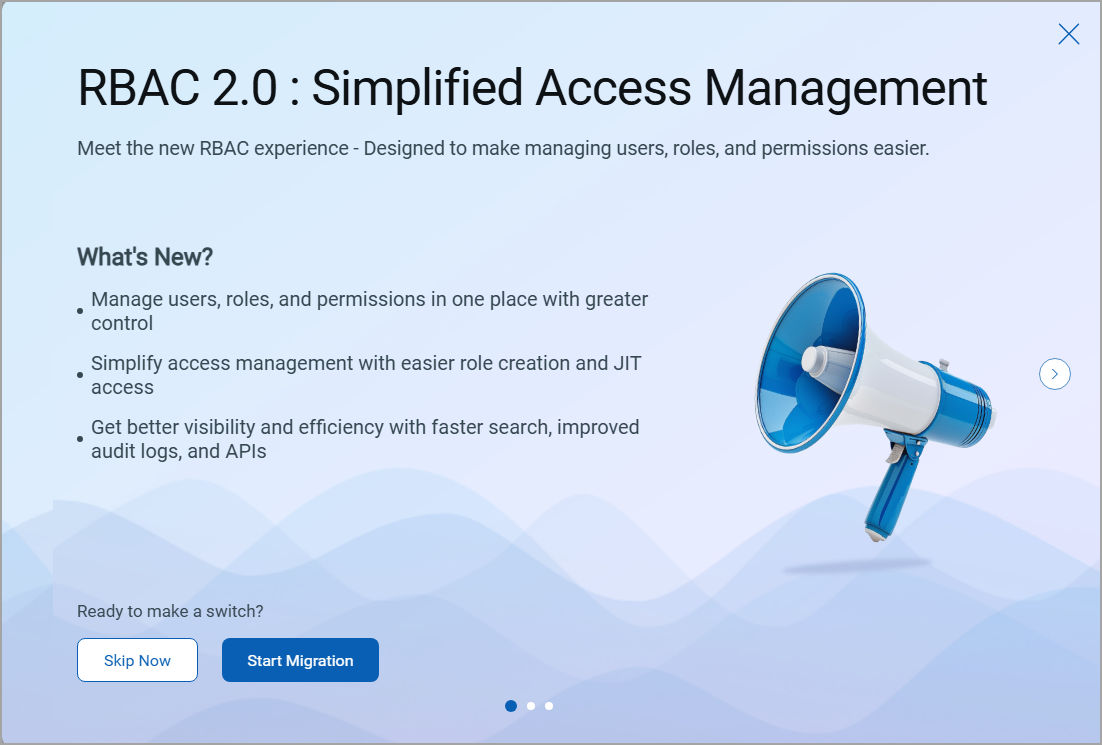
Step 1: Review the RBAC 2.0 Migration Pop-up Window
Log in to the Qualys Enterprise TruRisk™ Platform and open the Administration application. The RBAC 2.0 migration pop-up window appears. The pop-up window has three screens. To move between the screens, click the right arrow (>) or left arrow (<). Each screen displays the Skip Now and Start Migration options.
Step 2: Review the Prerequisites and Provide Consent
The Get Ready for the Updated RBAC Experience page lists what you must know before you start the migration. The page also highlights the key capabilities of the enhanced Administration application: Enhanced Audit Logging, Automatic User Provisioning with Microsoft Entra ID, Built to Scale, and Assignments Stay Intact.
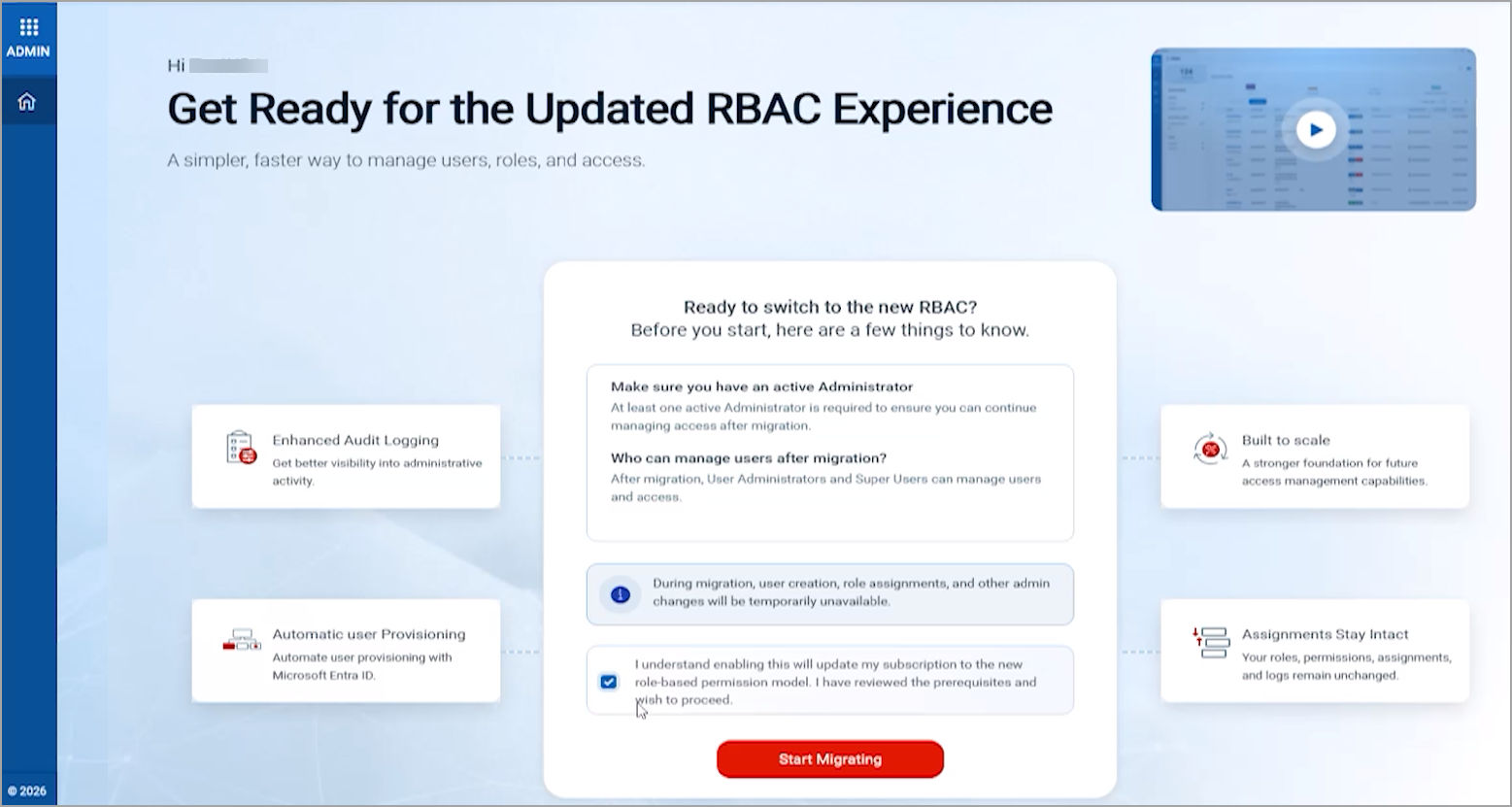
- Under Ready to switch to the new RBAC?, review the following prerequisites:
- Make sure you have an active Administrator: At least one active Administrator is required to ensure that you can continue to manage access after migration.
- Who can manage users after migration? After migration, User Administrators and Super Users can manage users and access.
- Read the information message. During migration, user creation, role assignments, and other admin changes are temporarily unavailable.
- (Optional) To learn more about the new experience, click the video at the top of the page. The video tour plays in a separate window. When you are done, click Close.
- Select the consent checkbox: I understand enabling this will update my subscription to the new role-based permission model. I have reviewed the prerequisites and wish to proceed.
- Click Start Migrating.
Step 3: Track the Migration Progress
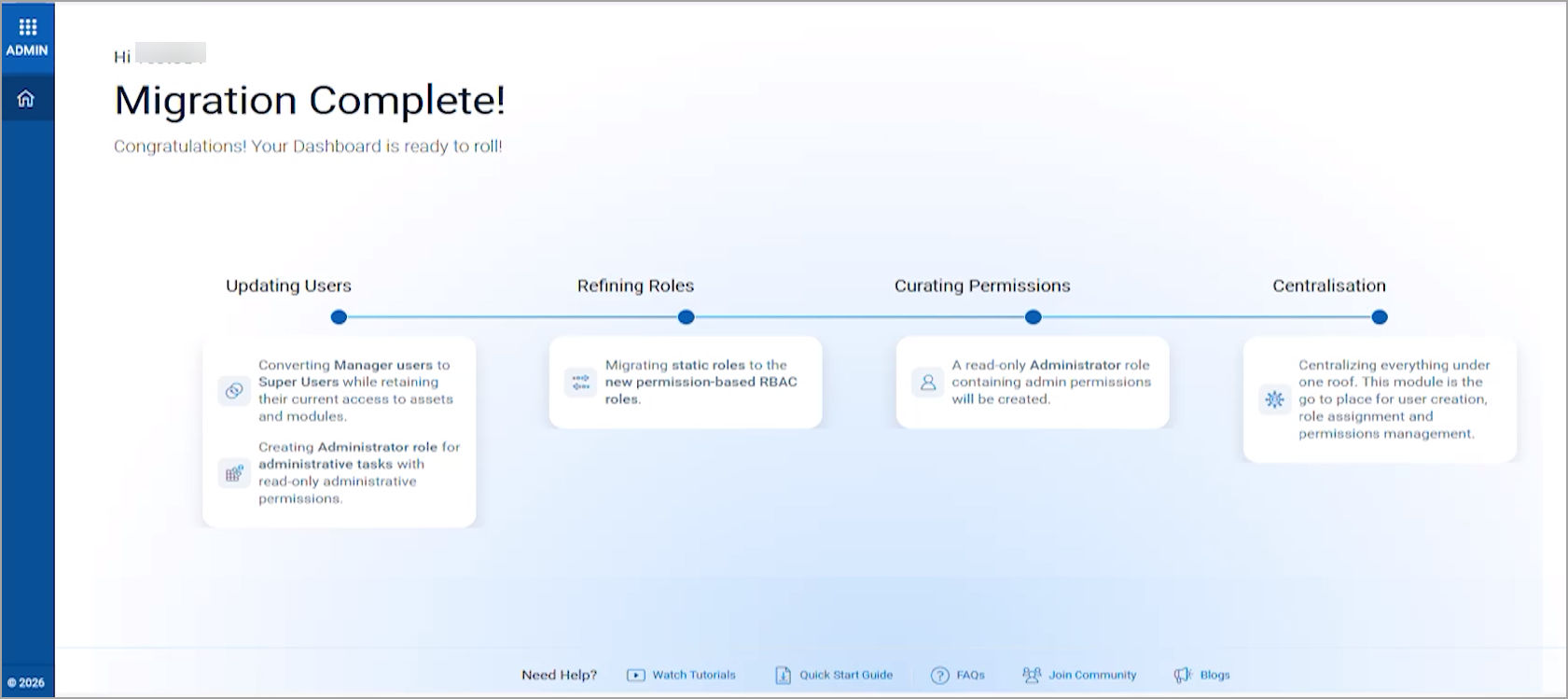
Click Start Migrating to begin the migration. The Sit back and relax while we get things ready page then shows the stages of the migration one after the other.
Step 4: Launch the Enhanced Administration Application
The Migration Completed Successfully page confirms that all roles, permissions, assignments, and audit history are migrated.
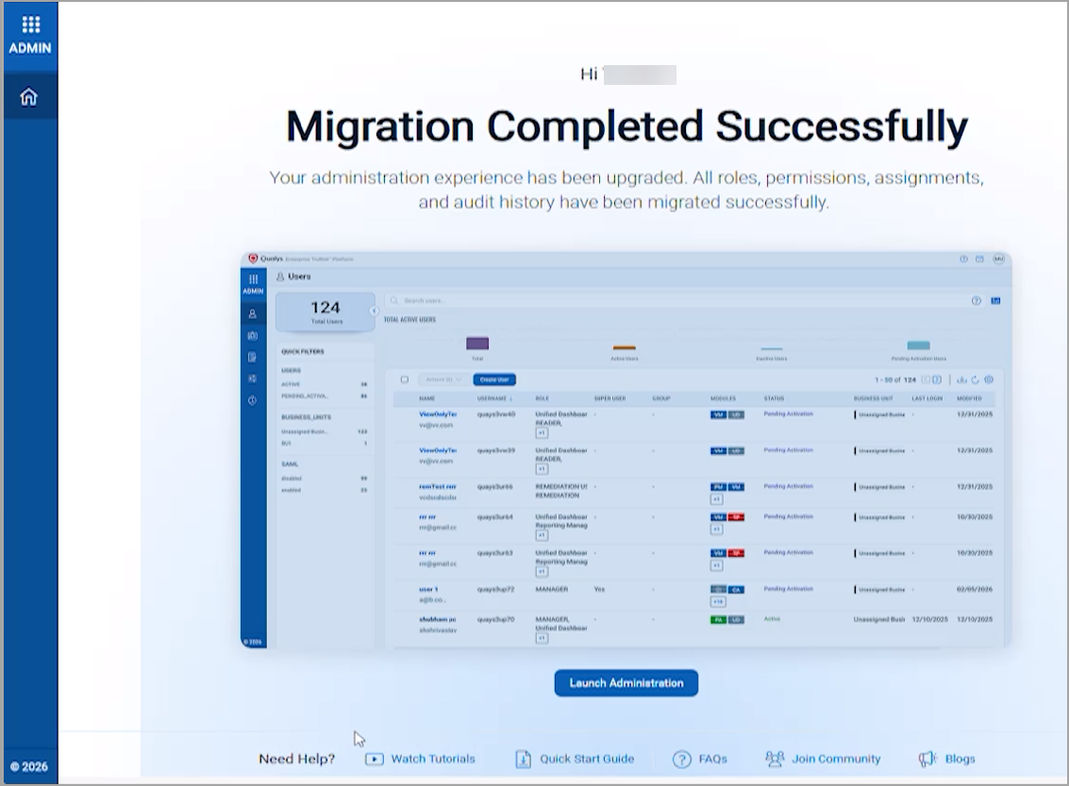
Click Launch Administration. The enhanced Administration application opens, and the welcome pop-up window appears.
Rollout timeline and how to plan your transition
RBAC 2.0 began rolling out on 29th October 2026. Qualys will provide in-platform notifications and email updates to existing customers as the rollout reaches each subscription.
To activate the new Administration application and enable applicable capabilities (such as Microsoft Entra ID Sync), contact your Technical Account Manager or Qualys Support at support@qualys.com.
| Phase | Phase 1: Adoption | Phase 2: Migration | Phase 3: Mandatory Migration |
| Duration | Day 1 to Day 90 | Day 90 to Day 150 | Starting Day 151 |
| What to Expect | An RBAC 2.0 enablement pop-up will appear at every eligible login. You can explore the new experience and choose Enable Now or Try Later. Migration remains voluntary during this phase. | Migration messaging will become more prominent, with a clearly communicated migration deadline. Customers are expected to migrate to RBAC 2.0 during this phase. The Try Later option will remain temporarily available. | The Try Later option will be removed. Migration to RBAC 2.0 will be mandatory to continue legacy administration activities. |
| Key Actions | Familiarize yourself with RBAC 2.0 and provide feedback. Choose Enable Now to start migration or Try Later to continue using legacy RBAC temporarily. Review the migration documentation and readiness checklist. | Plan and complete your migration to RBAC 2.0. Work with your Technical Account Manager (TAM) for assistance, if required. Share feedback and report any migration-related issues. | Complete your migration to RBAC 2.0. No new subscriptions can be created on Legacy RBAC. Qualys will execute migration scripts, preserve existing user-role mappings and scopes, and provide post-migration support. |