
Upcoming AssetView Sunset: Qualys Platform Specific EOS Plan & AV Dashboard Migration Guidance

As previously announced, Qualys AssetView will reach End of Service (EOS) in March 2026. Customers are encouraged to transition to the next-generation risk surface management capabilities available in the Qualys Enterprise TruRisk Platform.
Please refer to previous announcement for more details – https://notifications.qualys.com/notifications/2025/11/24/assetview-ends-march-2026-transition-to-next-generation-risk-surface-management
To ensure a smooth transition, this update provides:
- Qualys Platform specific schedule for disabling AssetView services
- Guidance on migrating AssetView dashboards to unified dashboards
1. AssetView End-of-Service Schedule
AssetView services will be disabled in phases across Qualys Platforms. The following schedule outlines when AssetView functionality will be retired in specific region.
| Platform | AssetView EOS Date |
| US05 | 14th April, 2026 |
| EU03 | 16th April, 2026 |
| AE01 | 20th April, 2026 |
| KSA01 | 20th April, 2026 |
| AU01 | 22nd April, 2026 |
| CA01 | 22nd April, 2026 |
| US04 | 27th April, 2026 |
| EU01 | 27th April, 2026 |
| US01 | 4th May, 2026 |
| US02 | 7th May, 2026 |
| UK01 | 11th May, 2026 |
| IN03 | 14th May, 2026 |
| EU02 | 18th May, 2026 |
| US03 | 21st May, 2026 |
2. Action Required: Migrating AssetView Dashboards
AssetView dashboards will not remain accessible after AssetView service sunset. Customers should migrate their AV dashboards to unified dashboards prior to the AssetView retirement date. To simplify the transition, the following options are available.
Option 1: Automatic Migration of Default Dashboards
At the time of AssetView sunset (specific to your platform/region), Qualys will automatically migrate ‘Default’ AssetView dashboards to unified dashboards.
No action required from Customers.
Option 2: (Qualys Recommended) Manually Migrate Selected Dashboards
Customers who wish to migrate specific AssetView dashboard(s) can move those dashboards by using highlighted option from AssetView dashboard ‘Action’ menu.
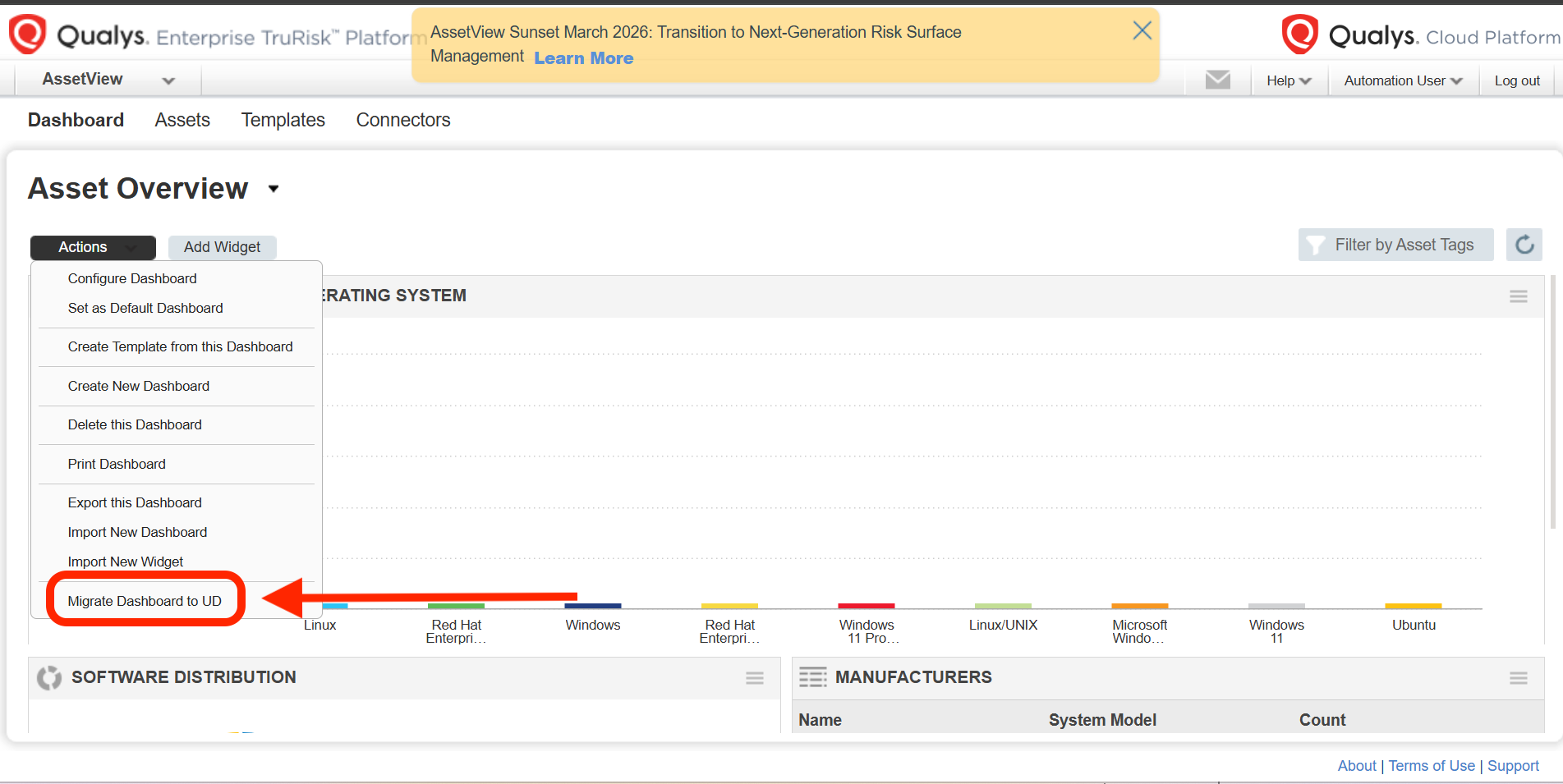
This approach allows users to selectively migrate dashboards that are most relevant to their workflows while taking advantage of enhanced visualization and customization capabilities available in Qualys unified dashboards.
Option 3: Request Bulk AV Dashboards Migration via Support
Customers with a large number of AssetView dashboards may request bulk migration assistance from Qualys Support.
To do so, please submit a technical support case using the following format,
| Product: | Asset View (Legacy) |
| Component: | Dashboard |
| Case Title: | Migrate All AV Dashboards |
| Description: | Qualys team, Please migrate all AV (AssetView) dashboards for our subscription to Qualys unified dashboards. |
Submitting a support request will allow Qualys team to assist with migrating all existing dashboards to unified dashboard framework prior to the AssetView service sunset.
If you have questions regarding the transition from Qualys AssetView or require assistance migrating dashboards, please contact Qualys Support.